GPT-6.1 Terra Is Now on Risphai: Benchmarks, Pricing and How to Use It
GPT-6.1 Terra is live on Risphai with Terra Pro. See OpenAI's benchmarks, the price at half of GPT-6.1 Sol, Terra vs Sol, reasoning levels and how to use it.
By Risphai·Updated
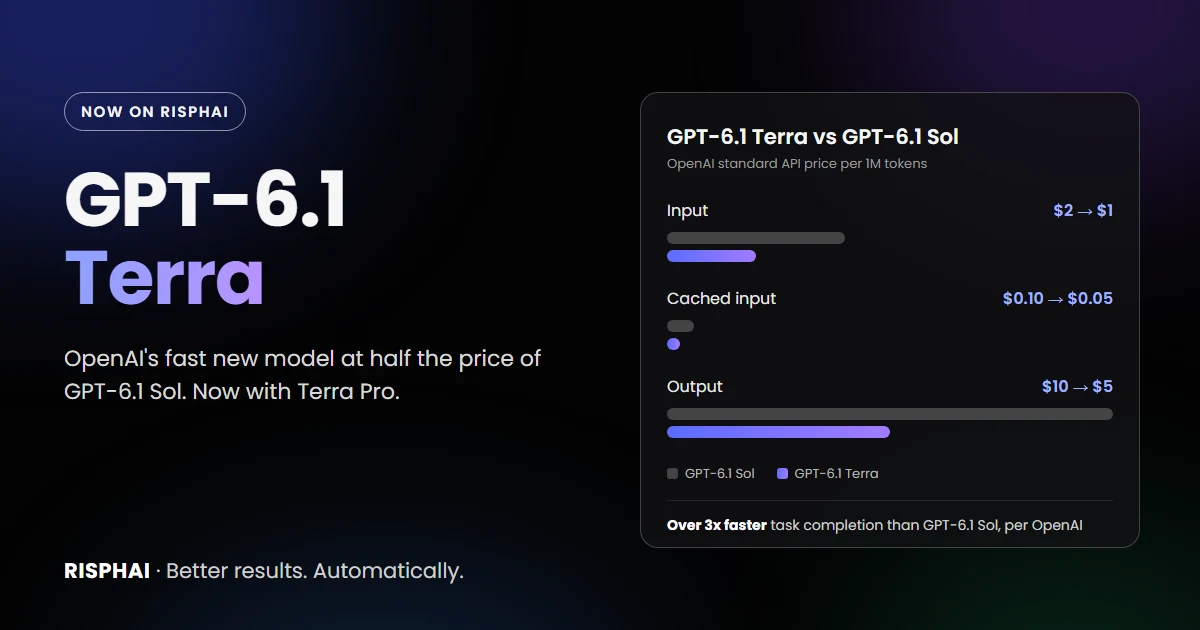
OpenAI's standard API prices for GPT-6.1 Terra and GPT-6.1 Sol. On Risphai, you pay in credits.
GPT-6.1 Terra is now on Risphai. OpenAI released it on October 26, 2026 as a fast, efficient model for visual reasoning, writing and everyday work, at half the API price of GPT-6.1 Sol. You can use it for chat, reasoning, writing and coding today, with five reasoning levels from Low to Max. GPT-6.1 Terra Pro is also available for harder reasoning and coding problems.
OpenAI positions Terra as a model with a new balance of speed, capability and cost. It is much stronger than GPT-5.6 Terra in OpenAI's tests, nearly matches OpenAI's larger models on several benchmarks and costs far less per AI word. That makes it a good default for the many requests that don't need the most expensive model.
Update, November 18, 2026: GPT-6.1 Terra and GPT-6.1 Sol are no longer available on Risphai. They were replaced by GPT-6.2 Sol and GPT-6.2 Astra, and saved GPT-6.1 selections now use GPT-6.2 Sol. The rest of this article describes GPT-6.1 Terra as it was offered from October 27 to November 17, 2026. See GPT-6.2 Sol and Astra Are Now on Risphai.
Update, October 30, 2026: The Balanced, Quality and Extreme Quality presets now use GPT-6.1 Terra by default for chat and writing, and Balanced and Quality also use GPT-6.1 Terra Thinking for reasoning. See where Risphai uses GPT-6.1 Terra.
Strong visual reasoning. On MMMU-Pro, a visual reasoning benchmark, Terra beats GPT-5.6 Terra at every reasoning setting and nearly matches GPT-6 Astra and GPT-6.1 Sol.
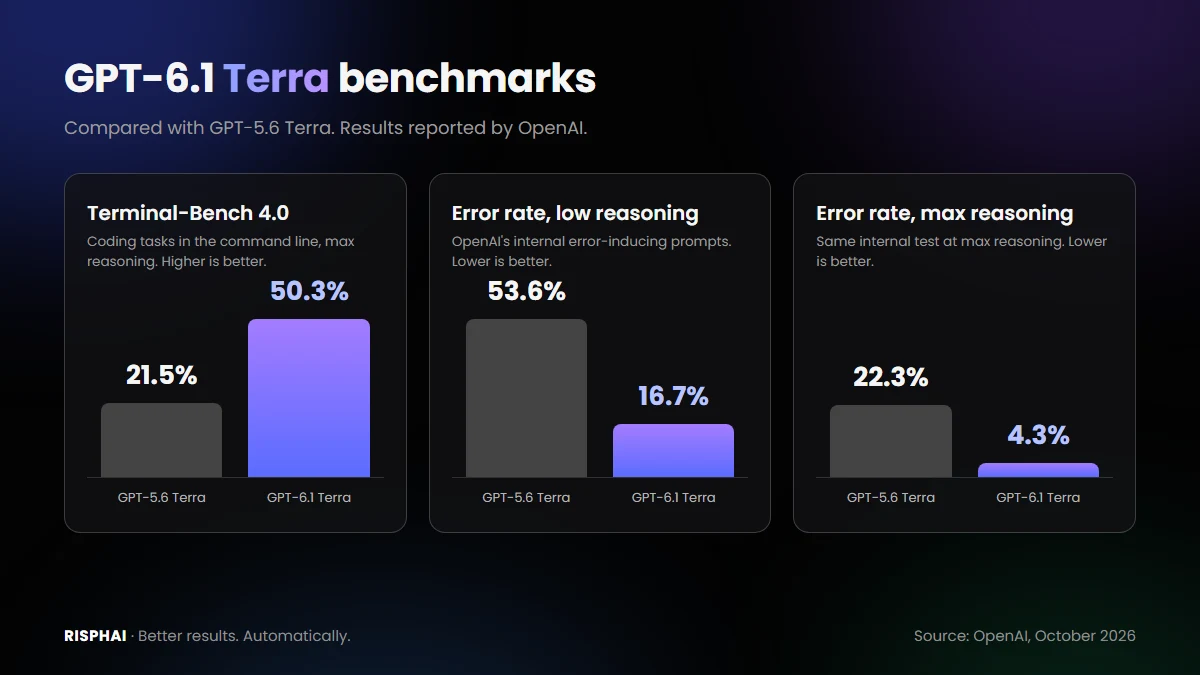
Fewer factual errors. On OpenAI's internal test with error-inducing prompts, the error rate at low reasoning fell from 53.6% to 16.7%. At max reasoning, it fell by 18 points to 4.3%, close to GPT-6 Astra and GPT-6.1 Sol.
Much better coding than the previous Terra. On Terminal-Bench 4.0 at max reasoning, Terra solves 50.3% of tasks, compared with 21.5% for GPT-5.6 Terra.
Clearer, more natural writing. OpenAI highlights writing and communication tasks, such as drafting proposals.
Speed. In OpenAI's computer-use tests, Terra completes tasks more than three times faster than GPT-6 Astra and GPT-6.1 Sol.
Lower price. OpenAI's standard API price is 50% below GPT-6.1 Sol and GPT-5.6 Terra.
OpenAI also built Terra for computer use, such as filling out forms or editing videos in desktop apps. Risphai doesn't control your computer, so on Risphai you use Terra's reasoning, vision and writing in the chat.
GPT-6.1 Terra Benchmarks
GPT-6.1 Terra compared with GPT-5.6 Terra. Results reported by OpenAI.
These are the results OpenAI published. We haven't run these benchmarks ourselves.
Benchmark
Reasoning
GPT-5.6 Terra
GPT-6.1 Terra
Terminal-Bench 4.0 (higher is better)
Max
21.5%
50.3%
Error rate on error-inducing prompts (lower is better)
Low
53.6%
16.7%
Error rate on error-inducing prompts (lower is better)
Max
22.3%
4.3%
Agents' Last Exam
Medium
Baseline
+15 points at about a third of the cost
The max-reasoning error rate for GPT-5.6 Terra follows from OpenAI's statement that the rate fell by 18 points to 4.3%. OpenAI also reports that on Agents' Last Exam, Terra at medium reasoning performs on par with GPT-6 Astra at a tenth of its price per AI word, and that on Terminal-Bench-Science 0.1 at max reasoning, it beats GPT-6.1 Sol at a lower cost.
Independent results are more mixed. Artificial Analysis, as reported by The Decoder, gives GPT-6.1 Terra an Intelligence Index of 48, compared with 52 for GPT-6.1 Sol and 42 for GPT-5.6 Terra. Benchmarks measure specific tasks, so results in your own work can differ.
GPT-6.1 Terra vs GPT-6.1 Sol
Both models are on Risphai, and they suit different jobs:
GPT-6.1 Sol
GPT-6.1 Terra
Price on Risphai
2x Terra per AI word
Half of Sol per AI word
Speed
Slower
Over 3x faster in OpenAI's computer-use tests
Knowledge cutoff
April 30, 2026
June 1, 2026
Artificial Analysis Intelligence Index
52
48
Best for
The most complex coding and reasoning
Everyday reasoning, writing, images, coding
Pro variant
Yes, on Premium
Yes, on Premium
OpenAI recommends GPT-6.1 Sol or GPT-6 Astra for the most complex coding tasks. For most other requests, Terra gives you a close result for half the credits. A simple rule: start with Terra, and switch to Sol when a task is very hard or Terra's answer isn't good enough. You can switch between them in the same chat.
GPT-6.1 Terra Pro
GPT-6.1 Terra Thinking Pro runs Terra in OpenAI's Pro reasoning mode, which is meant for harder problems. On Risphai it uses the same rates as GPT-6.1 Terra, but it usually thinks longer, so a response typically takes more time and uses more credits. Terra Pro is available for reasoning and coding with the same five reasoning levels, on the Premium plan.
Where You Can Use GPT-6.1 Terra on Risphai
Function
Model option
Reasoning levels
Chat
GPT-6.1 Terra
None
Writing
GPT-6.1 Terra
None
Reasoning
GPT-6.1 Terra Thinking
Low, Medium, High, Extra High, Max
Coding
GPT-6.1 Terra Thinking
Low, Medium, High, Extra High, Max
Reasoning and coding
GPT-6.1 Terra Thinking Pro (Premium)
Low, Medium, High, Extra High, Max
Risphai picks a model for each request based on the task and your quality preset. Since October 30, 2026, GPT-6.1 Terra is the default here:
Request
Cost Efficient
Fast
Balanced
Quality
Extreme Quality
Chat
Other model
Other model
GPT-6.1 Terra
GPT-6.1 Terra
GPT-6.1 Terra
Reasoning
Other model
Other model
GPT-6.1 Terra Thinking (Medium)
GPT-6.1 Terra Thinking (High)
GPT-6.1 Sol Thinking (High)
Writing
Other model
Other model
GPT-6.1 Terra
GPT-6.1 Terra
GPT-6.1 Terra
The Free plan uses Cost Efficient. The other presets are available on Paid plans, and in Advanced mode you can also choose GPT-6.1 Terra yourself. When GPT-6.1 Terra handles your chat, Risphai also uses it to write the answers to your web searches. If GPT-6.1 Terra is unavailable or your balance doesn't cover a request, Risphai automatically uses another model so your request still finishes.
Which Reasoning Level to Choose
Level
Best for
Low
Quick answers, everyday questions and simple code
Medium
Most reasoning and coding tasks
High
Harder math, logic and multi-step coding
Extra High
Difficult problems where accuracy matters most
Max
The hardest problems, when time and credits matter less
Higher levels let the model think longer before it answers. That usually improves results on hard problems, but takes more time and credits.
Choose a plan. Selecting models needs the Lite, Standard or Premium plan or pay-as-you-go credits. See the Pricing page.
Switch to Advanced mode and open the model settings in the chat box.
Pick GPT-6.1 Terra. Choose GPT-6.1 Terra for chat or writing, or GPT-6.1 Terra Thinking for reasoning or coding and set the reasoning level. On Premium, you can also choose GPT-6.1 Terra Thinking Pro.
Ask your question. You can save your selection as your default and switch models at any time.
Prompts to Try
GPT-6.1 Terra is strongest at visual reasoning, writing and efficient everyday work. These requests are a good start:
"What does this technical drawing show? List all dimensions and anything that looks inconsistent." (with an image)
"Turn these meeting notes into a clear project proposal with goals, timeline and risks."
"Extract the vendor, date, line items and total from this invoice as a table." (with a photo or screenshot)
"Find the bug in this function and explain the fix step by step." (with your code)
"Compare these two charts and explain the three most important differences." (with screenshots)
"Build a small to-do app in a single HTML file."
When Risphai writes runnable HTML, CSS and JavaScript, you can run it in the chat in a sandboxed preview and ask for changes.
GPT-6.1 Terra Pricing on Risphai
Per million AI words
Input
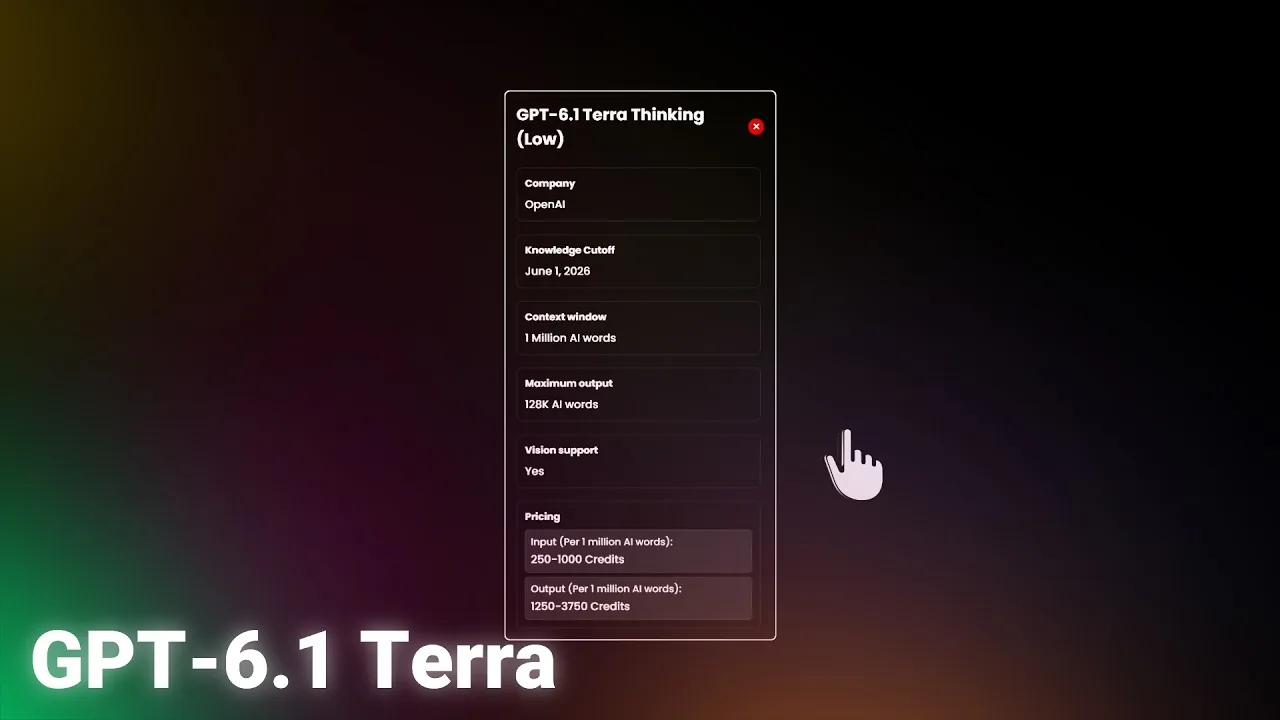
250 to 1,000 credits
Output (including thinking)
1,250 to 3,750 credits
The rate depends on the prompt length and the available OpenAI capacity. Risphai uses the lower rate whenever it can, and prompts over 272,000 AI words cost more, as in OpenAI's own pricing. Repeated parts of a conversation can be cached, which lowers the cost of long chats. GPT-6.1 Terra Thinking Pro uses the same rates.
For example, a request with 10,000 input AI words and 2,000 output AI words costs about 5 credits at the lower rate. The same request on GPT-6.1 Sol costs about twice as much. Like every response, the total also includes the processing charge described in the Terms. The exact credits are shown for each response, and current prices for its successor are on the GPT-6.2 Sol model page.
GPT-6.1 Terra is an OpenAI model released on October 26, 2026. OpenAI describes it as a fast, efficient model that combines detailed visual reasoning and precise computer use with clearer, more natural writing. Its standard API price is 50% lower than GPT-6.1 Sol and GPT-5.6 Terra.
Is GPT-6.1 Terra available on Risphai?
Yes. Since October 27, 2026, you can choose GPT-6.1 Terra Thinking for reasoning and coding with Low, Medium, High, Extra High or Max reasoning, and GPT-6.1 Terra without reasoning for chat and writing. GPT-6.1 Terra Thinking Pro is available for reasoning and coding on the Premium plan.
Is GPT-6.1 Terra better than GPT-6.1 Sol?
Not overall. GPT-6.1 Terra is cheaper and, according to OpenAI, completes computer-use tasks more than three times faster than GPT-6.1 Sol. OpenAI still recommends GPT-6.1 Sol or GPT-6 Astra for the most complex coding tasks, and Artificial Analysis gives GPT-6.1 Sol a higher Intelligence Index score (52) than GPT-6.1 Terra (48). For everyday tasks, writing and image-heavy questions, Terra is the more cost-efficient choice.
How much does GPT-6.1 Terra cost on Risphai?
GPT-6.1 Terra costs 250 to 1,000 credits per million input AI words and 1,250 to 3,750 credits per million output AI words, half the price of GPT-6.1 Sol. The rate depends on the prompt length and the available OpenAI capacity, and Risphai uses the lower rate whenever it can. Every response also includes the processing charge, and the exact credits are shown for each response.
What is GPT-6.1 Terra Pro?
GPT-6.1 Terra Thinking Pro runs GPT-6.1 Terra in OpenAI's Pro reasoning mode, which is meant for harder problems. It uses the same rates as GPT-6.1 Terra on Risphai, but usually thinks longer, so a response typically takes more time and more credits. It is available for reasoning and coding on the Premium plan.
Which quality presets use GPT-6.1 Terra?
Since October 30, 2026, the Balanced preset uses GPT-6.1 Terra for chat and writing and GPT-6.1 Terra Thinking (Medium) for reasoning. The Quality preset uses GPT-6.1 Terra for chat and writing and GPT-6.1 Terra Thinking (High) for reasoning. The Extreme Quality preset uses GPT-6.1 Terra for chat and writing. These presets are available on paid plans.
Can I use GPT-6.1 Terra for free?
Not yet. The Free plan includes 100 credits per month and uses the Cost Efficient preset, which doesn't use GPT-6.1 Terra by default. To choose GPT-6.1 Terra yourself, you need the Lite, Standard or Premium plan or pay-as-you-go credits. GPT-6.1 Terra Pro needs the Premium plan.
What is the context window of GPT-6.1 Terra?
OpenAI lists a context window of 1.05 million AI words for GPT-6.1 Terra, with up to 922,000 input AI words and up to 128,000 output AI words.
What is the knowledge cutoff of GPT-6.1 Terra?
OpenAI lists June 1, 2026 as the knowledge cutoff for GPT-6.1 Terra. On Risphai, the model can use web search when a question needs newer information.
Can GPT-6.1 Terra understand images?
Yes. GPT-6.1 Terra accepts text and images. You can attach screenshots, photos, charts or technical drawings and ask about them. It answers in text.
Which reasoning level should I use for GPT-6.1 Terra?
Start with Medium for most reasoning and coding tasks. Use Low for quick answers, High or Extra High for harder problems, and Max when a correct answer matters more than time and credits. Higher levels let the model think longer, which usually takes more time and credits.
gpt-6.1 terragpt 6.1 terragpt-6.1 terra progpt-6.1openaigpt-6.1 solai models