Kimi K3.1 Pro, the newest model from Moonshot AI, is now on Risphai and replaces Kimi K3. Moonshot AI says it's better at long coding tasks and finance work and makes fewer things up. On a paid plan, you can use it today for chat, writing, reasoning and coding.
Kimi K3.1 Pro Is Now on Risphai: What It's Good At and How to Use It
Kimi K3.1 Pro by Moonshot AI replaces Kimi K3 on Risphai. See what it's good at, how it compares with K3, what it costs and how to use it.
What It's Good At
- Long, detailed work. It can read very long documents and big projects in one go.
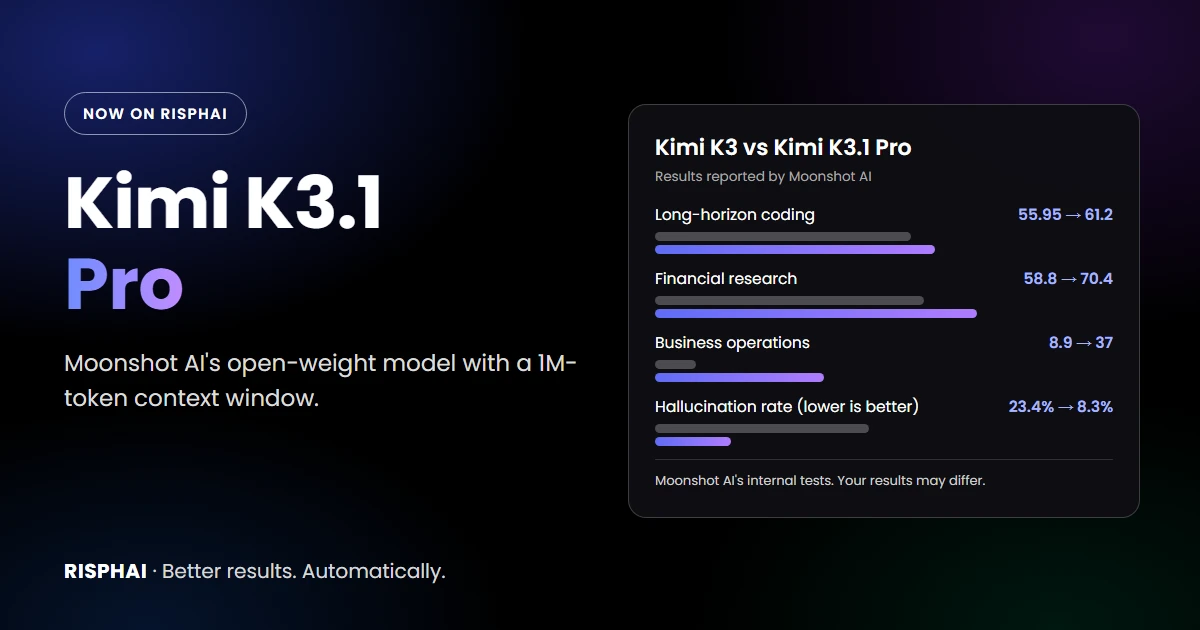
- Coding. Moonshot AI says it does better than Kimi K3 on long coding tasks.
- Finance and business. It did better on Moonshot AI's tests for financial research and business tasks.
- Fewer made-up answers. On Moonshot AI's hard test, the share of false claims fell from 23.4% to 8.3%. That test is designed to be tricky, so it doesn't show how often the model is wrong in everyday use.
- Understanding images. You can attach a screenshot, chart or photo and ask about it.
How It Compares
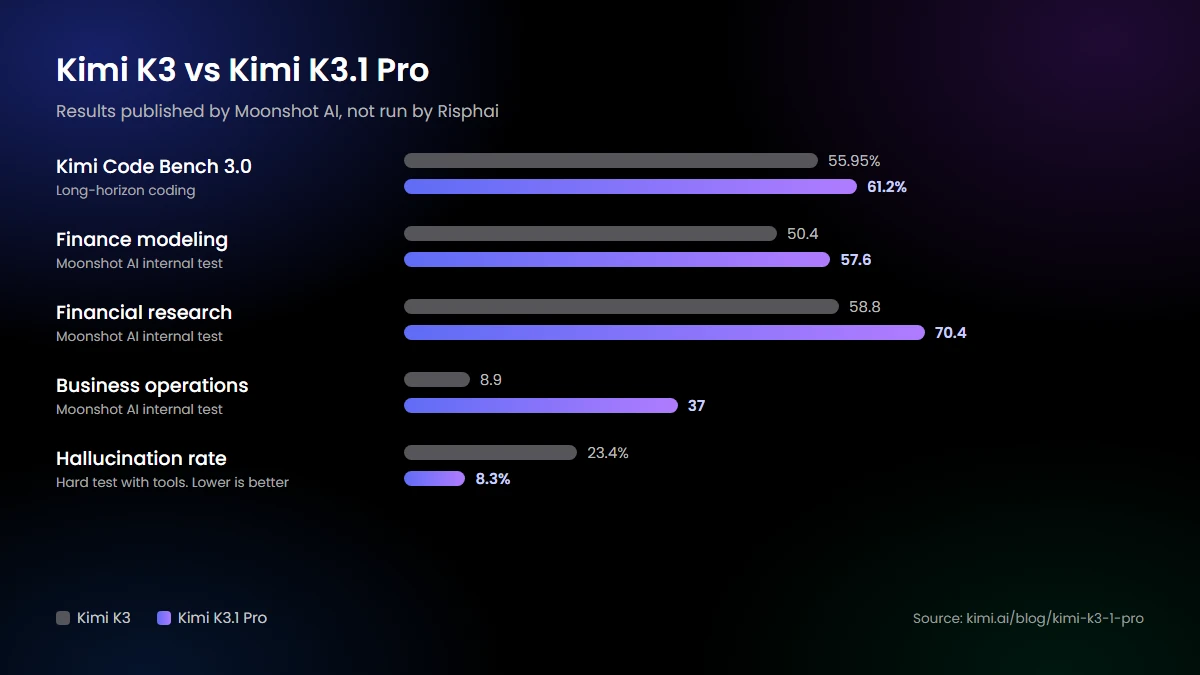
These results come from Moonshot AI, and many are its own tests. We didn't run them ourselves, and your results may differ.
It isn't the best at everything. In Moonshot AI's own comparisons, Claude Opus 5.5 scored slightly higher on one coding test and GPT-6 Astra made fewer false claims. Independent testers also found it slow to start answering when it thinks first, so turn thinking off or keep it low when you want a quick reply.
How to Use It
- Choose a plan on the Pricing page.
- Switch to Advanced mode and open the model settings in the chat box.
- Pick Kimi K3.1 Pro. For chat and writing, it answers right away. For reasoning and coding, choose how long it should think: Low, High or Max.
- Ask your question. You can switch models at any time.
More thinking can help with hard problems, but it usually takes longer and uses more credits.
Prompts to Try
- "Read this report and tell me the three most important points." (with your file)
- "Compare these two contracts and list what's different." (with your documents)
- "Build a simple budget from these numbers and explain it to me."
- "Make a small browser game I can play right here."
Always double-check important answers, especially about money, law or health. AI can make mistakes.
What It Costs
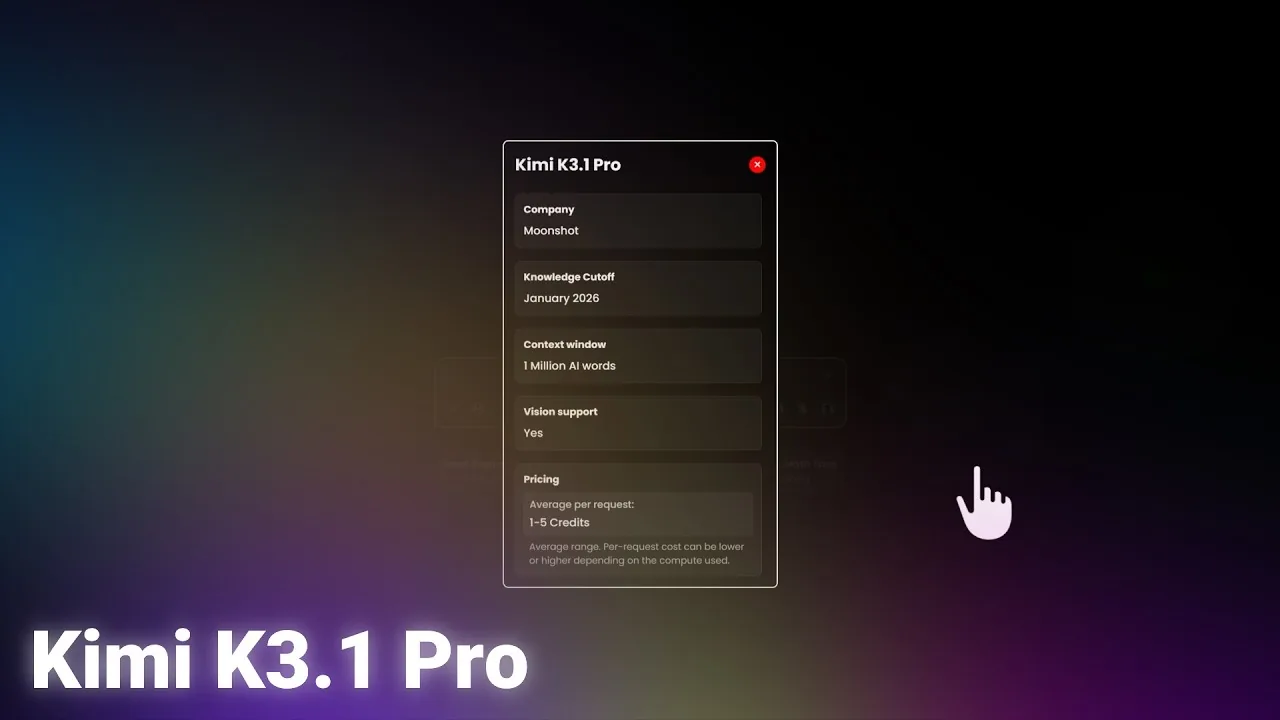
A request uses about 1 to 5 credits on average, the same as Kimi K3. It can be lower or higher depending on the request, and you always see the exact credits for each response. Paid plans include 3,000 to 20,000 credits every month. Compare plans on the Pricing page.
Try Kimi K3.1 Pro
Kimi K3.1 Pro is live on Risphai now. Choose a plan on the Pricing page, switch to Advanced mode and select it. See everything new in the v0.1.10 release notes. Kimi and Moonshot AI are the names of their owner, and Risphai isn't affiliated with or endorsed by Moonshot AI.
Frequently Asked Questions
What is Kimi K3.1 Pro?
Kimi K3.1 Pro is an AI model from Moonshot AI, released in October 2026. It is an improved version of Kimi K3 that can read text and images and answers in text.
Is Kimi K3.1 Pro better than Kimi K3?
In Moonshot AI's own tests, yes. It did better on long coding tasks and on finance and business work, and made fewer false claims on a hard test. It can take longer to start answering when it thinks first.
How much does Kimi K3.1 Pro cost on Risphai?
A request uses about 1 to 5 credits on average, the same as Kimi K3. It can be lower or higher depending on the request, and you see the exact credits for each response.
Can I use Kimi K3.1 Pro for free?
The Free plan doesn't use Kimi K3.1 Pro by default. Choosing it yourself needs a paid plan or Pay As You Go credits.
What happens if I had Kimi K3 selected?
Nothing you need to do. Your choice moves to Kimi K3.1 Pro automatically.
What is the knowledge cutoff of Kimi K3.1 Pro?
Risphai lists January 2026, the same as Kimi K3, the model it builds on. On Risphai, the model can search the web when a question needs newer information.