What Is Model Routing? How AI Chooses the Right Model for Each Request
Model routing sends each AI request to a model that fits the task. Learn what it is, why it gives better results and how Risphai does it for you.
By Risphai
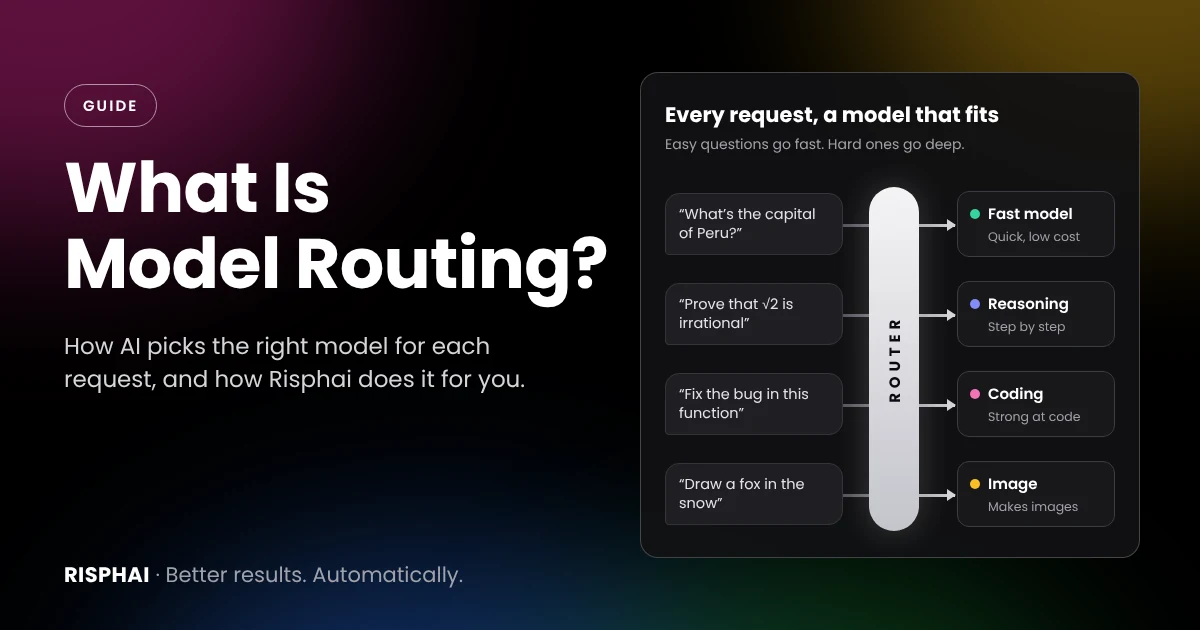
Model routing: a router reads each request and sends it to a model that fits the task.
Model routing is the automatic choice of an AI model for each request. Instead of sending everything to one model, a router looks at what you asked and sends it to a model that fits the task. Quick questions get fast answers, and harder problems get stronger models. Risphai does this for every message, so you get a suitable model without choosing one yourself.
There is no single best AI model. Some answer in a second, others take time to think. Some write well, others are better at math or code, and only some can understand images. Picking the right one for every message is a lot to ask. Model routing does it for you.
What Is Model Routing?
Model routing, also called LLM routing or AI model routing, means an AI app chooses the model for you, one request at a time. The part that makes the choice is called a model router.
Think of a good restaurant kitchen. Not every order goes to the same cook: drinks go to the bar, desserts to the pastry chef and the main course to the grill. Each dish ends up with the person who does it best, and everything arrives faster. A model router does the same with your requests.
One model for everything
Model routing
Quick questions
Can be slower than needed
Fast answers
Hard problems
Depends on that one model
A model that's good at reasoning
Writing and code
Same model for both
A model suited to each task
Images and files
Only if that model supports them
A model that can handle them
Your effort
You pick the model
Chosen for you
Why Model Routing Gives Better Results
Better answers. Each task goes to a model that is strong at it, instead of one model doing everything.
Faster answers. Simple questions don't wait for a model that thinks for a long time.
More value for your credits. Easy requests don't need the most expensive model. In the RouteLLM study by LMSYS and UC Berkeley, routing cut costs by over 85% on one benchmark while keeping 95% of GPT-4's performance. Results in everyday use depend on the requests.
Fewer interruptions. If a model is busy or unavailable, a router can use another one, so your request can still get an answer.
No model hunting. You don't need to follow every new release or compare models before you ask something.
How Model Routing Works
In simple terms, a model router does three things:
It understands the request. Is it a quick question, a math problem, a piece of writing, code or an image?
It picks a model. It chooses a model that fits the task, balancing quality, speed and cost.
It makes sure the request gets answered. If the first choice can't handle the request, it uses another suitable model.
Large AI companies use routing too. When OpenAI launched GPT-5, its system card described a router that decides between a fast model and a deeper reasoning model for each conversation.
Is Automatic Routing Always Right?
Not always, and that's worth knowing. A router can occasionally choose a different model than you would have, and some people simply have a favorite model for certain tasks. That's why good routing should be transparent and easy to override. On Risphai you can always see which model answered, and on paid plans you can choose the model yourself.
How Risphai Routes Your Requests
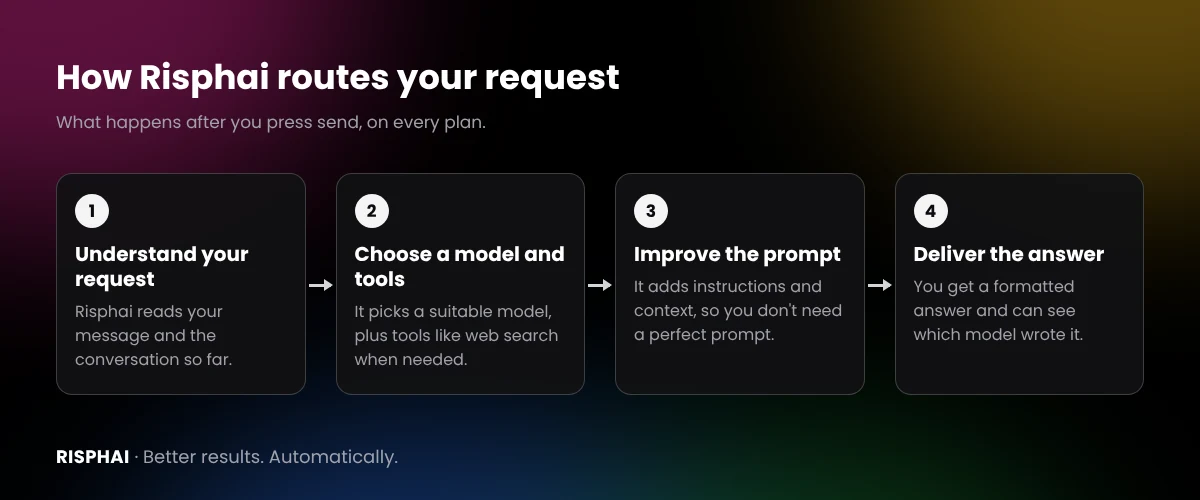
Risphai was built around model routing. Every message goes through four steps in the background:
What happens after you press send.
Understanding your request. Risphai reads your message and the conversation so far to work out what you need.
Choosing a model and tools. It picks a suitable model from providers such as OpenAI, Anthropic, Google, xAI and DeepSeek, plus tools like web search or image generation when the task needs them.
Improving the prompt. It adds task-specific instructions, relevant context and your preferences, so you don't need to write a perfect prompt.
Delivering the answer. You get a formatted answer with sources, files, images or other media when they help.
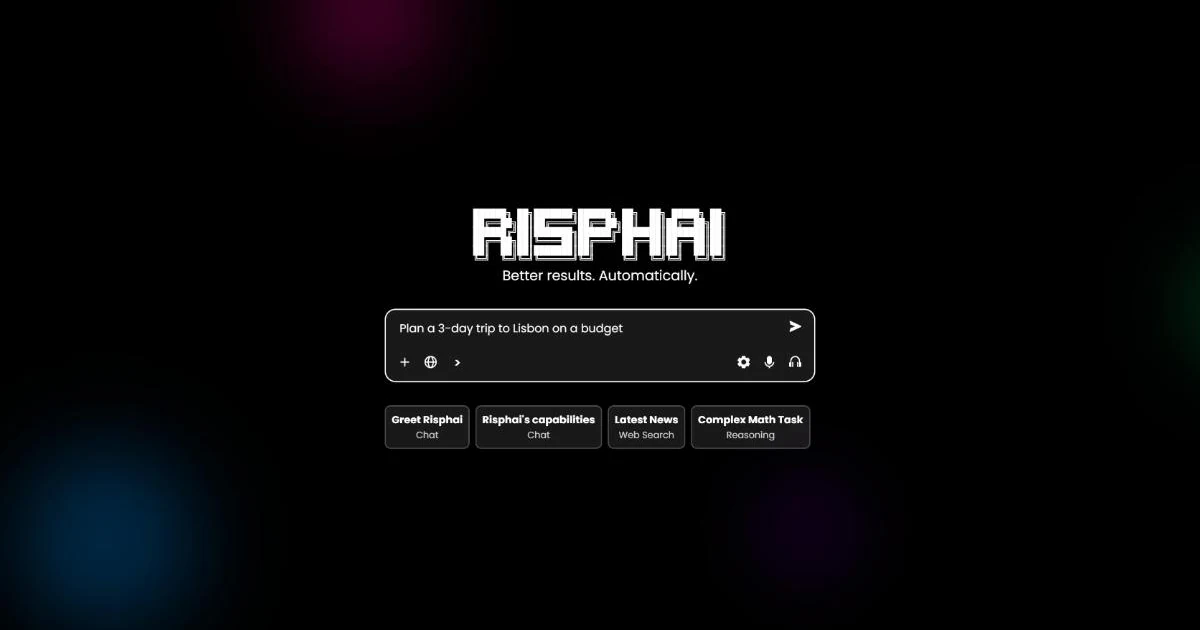
You just type. Chat, research, writing, coding and image generation all happen in the same place.
Quality presets
Quality presets let you decide what matters most, and Risphai routes your requests with that in mind:
Preset
What it does
Cost Efficient
Uses cheaper models
Fast
Uses faster models
Balanced
Balances cost, speed and quality
Quality
Uses high-quality models while considering cost and speed
Extreme Quality
Uses higher-quality models, which may cost more and take longer
The Free plan uses Cost Efficient. All five presets are available on Paid plans.
You Stay in Control
Automatic doesn't mean hidden:
See which model answered. Open the response info on any answer to see the model and the credits it used.
Pick a task type. In Advanced mode, you can tell Risphai to treat a message as chat, reasoning, coding or writing.
Choose the model yourself. On Paid plans, choose the model for each type of task. Premium adds GPT Pro models and Claude Opus 5.5.
Most people let Risphai choose most of the time and step in only when they have a favorite model for a specific job.
Free Plan vs. Paid Plans
Every plan uses automatic model routing. Paid plans give you more credits, better models and more control:
Free
Paid plans (Lite, Standard, Premium)
Credits per month
100
3,000, 7,500 or 20,000
Automatic model routing
Yes
Yes
Quality presets
Cost Efficient
All five
More capable models
No
Yes
Choose the model yourself
No
Yes
Quick and Deep Research
No
Yes
Video and audio generation
No
Yes
Voice mode
No
Yes
Credit use depends on the request, and the exact credits are shown for each response. Current prices are on the Pricing page.
Try Model Routing on Risphai
Model routing gives you a suitable model for every request without the model hunting. Start free with 100 credits every month, no credit card needed, or compare plans on the Pricing page to unlock every quality preset and choose your own models.
Frequently Asked Questions
What is model routing?
Model routing is the automatic choice of an AI model for each request. A router looks at what you asked and sends it to a model that fits the task, so quick questions get fast answers and harder problems get stronger models.
What is an LLM router?
An LLM router is the part of an AI app that decides which large language model answers each request. Instead of sending everything to one model, it picks from several models based on the task.
Why is model routing useful?
No single AI model is the best at everything. Some are faster, some are better at reasoning, writing or code, and some cost less. Model routing uses a suitable model for each task, which can improve results, speed and cost compared with using one model for everything.
Does Risphai use model routing?
Yes. Risphai routes every request on every plan, including the Free plan. It chooses a suitable model and tools for your task and adds task-specific instructions before answering, so you don't have to choose a model yourself.
Can I choose the AI model myself on Risphai?
Yes, on paid plans. Switch to Advanced mode to pick a quality preset or choose the model for each type of task yourself. GPT Pro models and Claude Opus 5.5 are available on the Premium plan.
Can I see which model answered?
Yes. Open the response info on any answer to see which model was used and how many credits the answer used.
Is model routing free on Risphai?
Yes. Every plan uses automatic model routing, including the Free plan with 100 credits per month. Paid plans include 3,000 to 20,000 credits per month, all quality presets and manual model selection. Current prices are on the Pricing page.
Which AI models does Risphai use?
Risphai chooses from model families such as GPT, Claude, Gemini, Grok, DeepSeek, Kimi and GLM, plus image, video and audio models. Which model answers depends on the task, your plan and your settings. The Information page lists the current models and prices.
model routingllm routingai model routerai modelsguide