Gemini 4 Neon Is Now on Risphai: Google's Balanced Gemini 4 Model, for Fewer Credits
Gemini 4 Neon replaces Gemini 4 Argon on Risphai at 25% fewer credits per AI word, with XHigh thinking. See what's new, pricing and Neon vs Hydrogen vs Carbon.
By Risphai
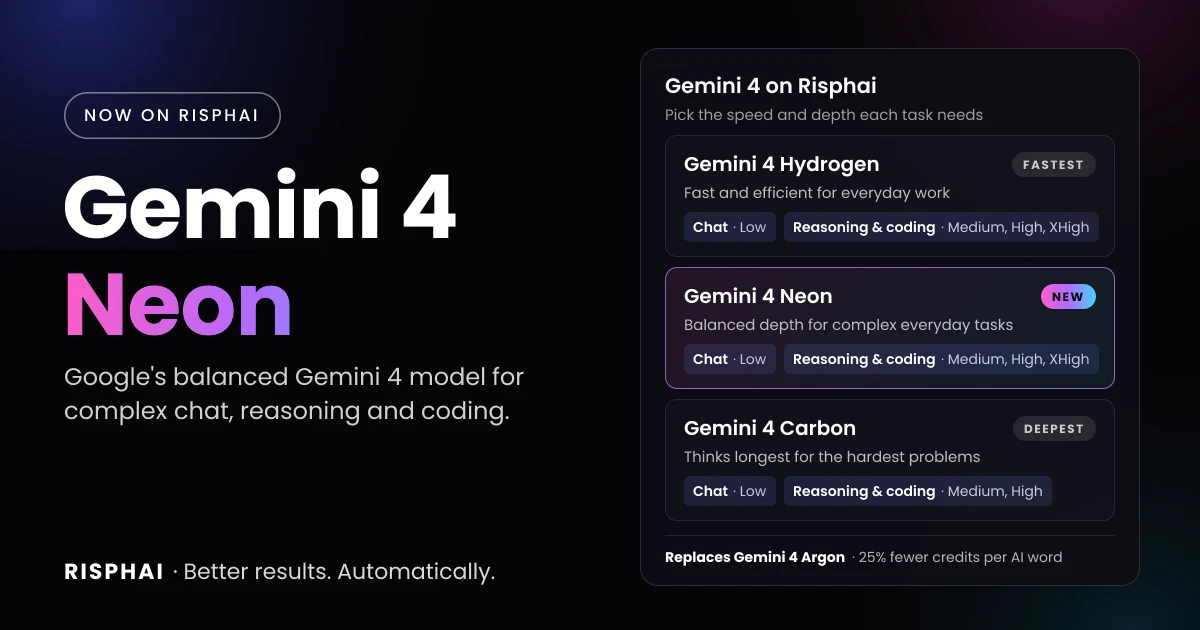
Gemini 4 Neon replaces Gemini 4 Argon on Risphai, at 25% fewer credits per AI word.
Gemini 4 Neon is now on Risphai, and it replaces Gemini 4 Argon. Google published Neon on November 18, 2026 as a Gemini 4 model that balances depth and efficiency, between the fast Gemini 4 Hydrogen and the deep-thinking Gemini 4 Carbon. On Risphai, it costs 25% fewer credits per AI word than Argon did, adds a new XHigh thinking level and is available on every paid plan.
If you used Gemini 4 Argon, you don't need to do anything. Your saved selections now use Gemini 4 Neon at the same thinking level.
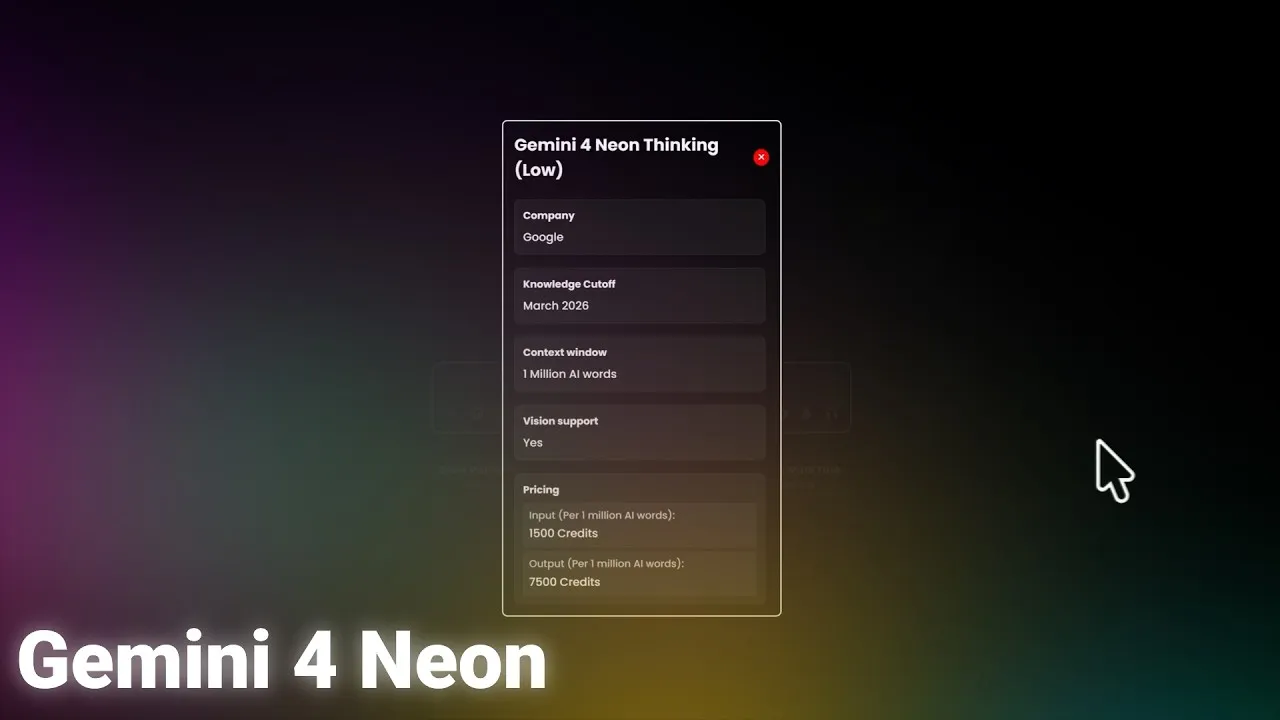
1,048,576 AI words, shared by input, thinking and output
Maximum output on Risphai
About 65,000 AI words per response, including thinking
Knowledge cutoff
March 2026
Thinking levels on Risphai
Low in chat, Medium, High and XHigh in reasoning and coding
Plans
Lite, Standard, Premium and Pay As You Go
Price on Risphai
1,500 credits input, 7,500 credits output per million AI words
What Changes for You
Switching from Gemini 4 Argon to Gemini 4 Neon brings three changes:
It costs less. Neon uses 25% fewer credits per AI word than Argon: 1,500 instead of 2,000 credits per million input AI words and 7,500 instead of 10,000 per million output AI words. The same credits now go further.
It can think harder. Argon stopped at High thinking. Neon adds XHigh for reasoning and coding, for the problems where you want the most careful answer.
Nothing to set up. Saved Argon selections move to Neon automatically, and links to the Argon model and comparison pages now open the Neon pages. Earlier conversations stay as they are.
How many credits a single answer uses still depends on how long the model thinks, so it can vary from question to question. You always see the exact credits for each response.
Coding across a whole project. Google says Neon finds bugs across a codebase and changes many files at once in fewer steps, with clean edits.
Safer code. Google says Neon writes code with fewer security vulnerabilities and is better at fixing the root cause of one.
Long tasks with many steps. Over long sessions with many tool calls, Google says Neon stays on track, rereads files less and makes fewer things up.
Dense documents and spreadsheets. Google says Neon turns long documents, spreadsheets and charts into structured results, with strong results on legal, finance, science and math tasks.
Efficient thinking. Google says Neon reaches high quality with fewer AI words and finishes tasks faster.
These are Google's own statements, and Google doesn't compare most of them with a specific earlier model. We haven't tested them ourselves, and results in your own work can differ. Google's model card has the full benchmark results if you want the details.
Gemini 4 Hydrogen vs Neon vs Carbon: Which Should You Use?
All three Gemini 4 models are on Risphai. Google built them for different jobs:
When Gemini 4 Neon handles your chat, Risphai also uses it to write the answers to your web searches, URL reading and research. If Gemini 4 Neon is unavailable or your balance doesn't cover a request, Risphai automatically uses another model so your request still finishes, and shows you which model answered.
Which Thinking Level to Choose
Gemini 4 Neon always thinks before it answers. The thinking level sets how much:
Level
Where
Best for
Low
Chat
Quick answers, everyday questions and writing that needs light thinking
Medium
Reasoning and coding
Routine problems, at fewer credits per answer
High
Reasoning and coding
Most reasoning and coding. Google's default level for Neon
XHigh
Reasoning and coding
The hardest problems, when you want Neon to think the longest
Higher levels usually give better results on hard problems, but take more time and credits. Risphai shows a summary of the model's thinking while it works.
Prompts to Try
Gemini 4 Neon is strongest on work with many moving parts. These requests are a good start:
"Here are three files from my project. Find why the checkout total is wrong, fix it in every file that needs it and explain each change." (with your code)
"Review this function for security problems and show me a safer version." (with your code)
"Compare these two quarterly reports and give me a table of the five biggest changes, with the page each number comes from." (with your files)
"Read this lease and list every deadline, fee and condition for getting my deposit back." (with your file)
"What does this chart really show? Check whether the headline is supported by the data." (with a screenshot)
"Plan a product launch for a small online shop: timeline, budget table and a checklist, and look up current shipping rules online."
On Risphai, Gemini 4 Neon can also run Python to check its math, analyze your data or draw charts, and runnable HTML, CSS and JavaScript can be previewed right in the chat. Always double-check important answers, especially about money, law or health. AI can make mistakes.
Choose a plan. Selecting models needs the Lite, Standard or Premium plan or Pay As You Go credits. See the Pricing page.
Switch to Advanced mode and open the model settings in the chat box.
Pick Gemini 4 Neon. Choose Gemini 4 Neon Thinking (Low) for chat, or Gemini 4 Neon Thinking for reasoning or coding and set Medium, High or XHigh.
Ask your question. You can save your selection as your default and switch models at any time.
Gemini 4 Neon Pricing on Risphai
Gemini 4 Neon
Gemini 4 Argon (previous price)
Input, per million AI words
1,500 credits
2,000 credits
Output, per million AI words (including thinking)
7,500 credits
10,000 credits
For example, a request with 10,000 input AI words and 2,000 output AI words uses about 30 credits with Gemini 4 Neon. The same request used about 40 credits with Gemini 4 Argon. Because thinking counts as output, harder questions and higher thinking levels use more. Repeated parts of a conversation can be cached, which lowers the cost of long chats. Like every response, the total also includes the processing charge described in the Terms. The exact credits are shown for each response, and current prices are on the Gemini 4 Neon model page.
Risphai doesn't train AI models on your conversations. See the Privacy Policy for how each privacy mode works and which providers handle your requests.
Google, Gemini and Google AI Studio are trademarks of Google LLC. Risphai isn't affiliated with or endorsed by Google. Model details are taken from Google's developer documentation and model card as of November 19, 2026.
Gemini 4 Neon is an AI model from Google, published on November 18, 2026. Google places it between Gemini 4 Hydrogen and Gemini 4 Carbon and describes it as a balance of depth and efficiency for complex tasks you run often, such as coding across a whole project, long tasks with many steps and work with dense documents and spreadsheets. It reads text, images, audio, video and PDFs, writes text and has a 1 million AI word context window.
Is Gemini 4 Neon available on Risphai?
Yes. Since November 19, 2026, you can choose Gemini 4 Neon Thinking (Low) for chat and Gemini 4 Neon Thinking with Medium, High or XHigh thinking for reasoning and coding. It is available on the Lite, Standard and Premium plans and with Pay As You Go credits.
Does Gemini 4 Neon replace Gemini 4 Argon on Risphai?
Yes. Since November 19, 2026, Risphai offers Gemini 4 Neon instead of Gemini 4 Argon. If you had saved Gemini 4 Argon as your default, Risphai now uses Gemini 4 Neon at the same thinking level, so you don't need to change anything. Your earlier conversations stay as they are.
Is Gemini 4 Neon cheaper than Gemini 4 Argon?
Yes, per AI word. On Risphai, Gemini 4 Neon costs 1,500 credits per million input AI words and 7,500 credits per million output AI words, including thinking. Gemini 4 Argon cost 2,000 and 10,000 credits, so Neon is 25% cheaper per AI word. The credits for a single answer still depend on how long the model thinks, so they can vary from question to question.
What is the difference between Gemini 4 Neon and Gemini 4 Carbon?
Google recommends Gemini 4 Carbon for its hardest architecture, debugging, science and security problems, and places Neon below it for complex tasks you run often. On Risphai, Neon costs 25% fewer credits per AI word than Carbon and offers XHigh thinking, while Carbon goes up to High. Both have a 1 million AI word context window and a March 2026 knowledge cutoff.
What is the difference between Gemini 4 Neon and Gemini 4 Hydrogen?
Google recommends Gemini 4 Hydrogen as the default for everyday coding and agent work, and places Neon above it for more complex tasks. Hydrogen is the fastest and cheapest of the three Gemini 4 models on Risphai, at 750 credits per million input AI words and 3,750 per million output AI words. Neon costs twice as much per AI word. Both offer Low thinking in chat and Medium, High and XHigh in reasoning and coding.
How much does Gemini 4 Neon cost on Risphai?
Gemini 4 Neon costs 1,500 credits per million input AI words and 7,500 credits per million output AI words, including thinking. For example, a request with 10,000 input AI words and 2,000 output AI words uses about 30 credits. Each response also includes the processing charge, and you see the exact credits for every response.
Can I use Gemini 4 Neon for free?
Not on Risphai's Free plan. The Free plan includes 100 credits every month and Risphai picks the models for you. To choose Gemini 4 Neon yourself, you need the Lite, Standard or Premium plan or Pay As You Go credits.
What is XHigh thinking in Gemini 4 Neon?
XHigh is the highest of Gemini 4 Neon's four thinking levels: Low, Medium, High and XHigh. It lets the model think the longest before it answers, which usually helps on hard problems but takes more time and uses more credits per answer. Gemini 4 Argon stopped at High. On Risphai, you can choose XHigh for reasoning and coding.
What is the context window of Gemini 4 Neon?
Google lists a context window of 1,048,576 AI words that input, thinking and output share. On Risphai, a single response can be up to about 65,000 AI words, including thinking, which is Google's limit for standard responses.
What is the knowledge cutoff of Gemini 4 Neon?
Google's model card lists March 2026 as the knowledge cutoff for Gemini 4 Neon and notes that its knowledge may be less current in some areas. On Risphai, the model can use web search when a question needs newer information.
gemini 4 neongemini neongoogle gemini 4 neongemini-4-neongemini 4 neon pricinggemini 4 neon vs argongemini 4 neon vs carbongemini 4 neon vs hydrogengemini 4 argongemini 4google geminigoogleai models