GPT-6.1 Sol vs Gemini 4 Argon: Which AI Builds the Better 3D Shooter?
We asked GPT-6.1 Sol and Gemini 4 Argon to build a 3D shooter in Risphai. Play both games and see how they compare on gameplay, speed and cost.
By Risphai
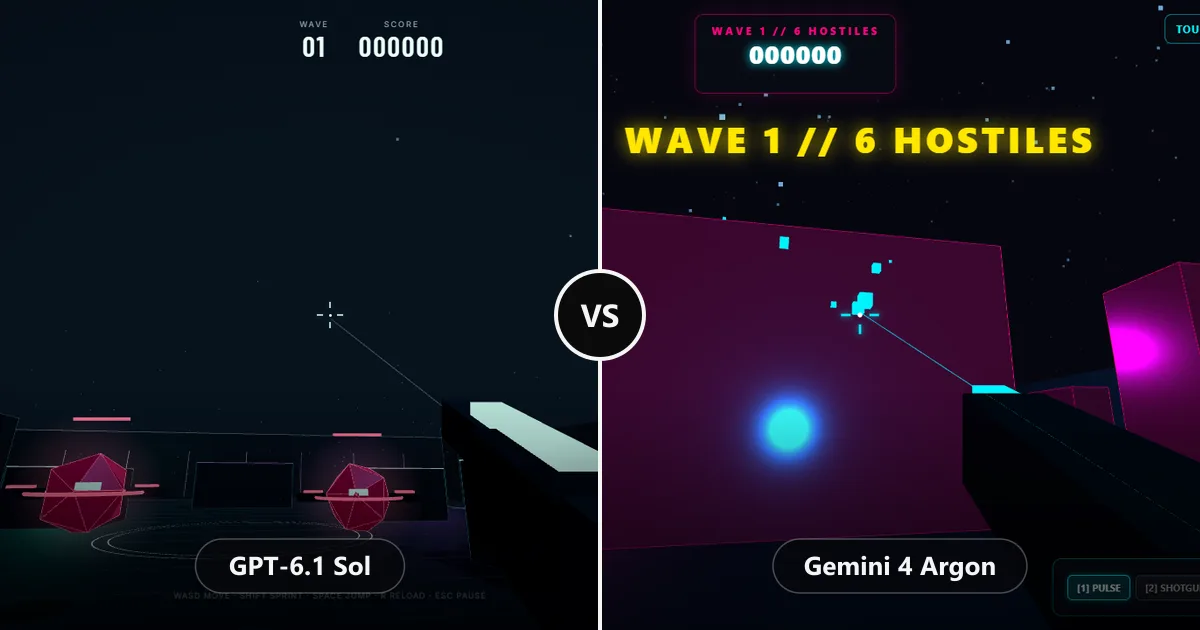
Left: Vector Strike, built by GPT-6.1 Sol. Right: Neon Overdrive, built by Gemini 4 Argon. You can play both below.
We asked GPT-6.1 Sol and Gemini 4 Argon to build the same thing in Risphai: a 3D shooter that runs in the browser. Both delivered a complete, working game in a single HTML file, and you can play both right here. GPT-6.1 Sol built the more balanced and polished game and used about 53% fewer credits. Gemini 4 Argon was faster and packed in more weapons and enemies.
GPT-6.1 Sol is the coding model behind Risphai's Balanced, Quality and Extreme Quality presets. This test shows why, and where Gemini 4 Argon is still the better pick.
The Test
Both models got the same request: build a 3D shooter that runs in the browser. Both answered with a single HTML file, chose Three.js for the 3D graphics and wrote everything else themselves, from enemies and waves to sound effects, menus and touch controls.
We then played both games and compared:
Gameplay: how fun and fair the game feels, and how the difficulty ramps up.
Features and polish: weapons, enemies, menus, sound and controls.
Speed and cost: how fast each model finished and how many credits it used.
This is one test with one request, not a benchmark. AI output varies from run to run, so a different prompt or game could change the result.
Play GPT-6.1 Sol's Game: Vector Strike
GPT-6.1 Sol
Desktop: WASD to move, mouse to aim, click to fire. Touch: stick to move, drag to aim, FIRE to shoot.
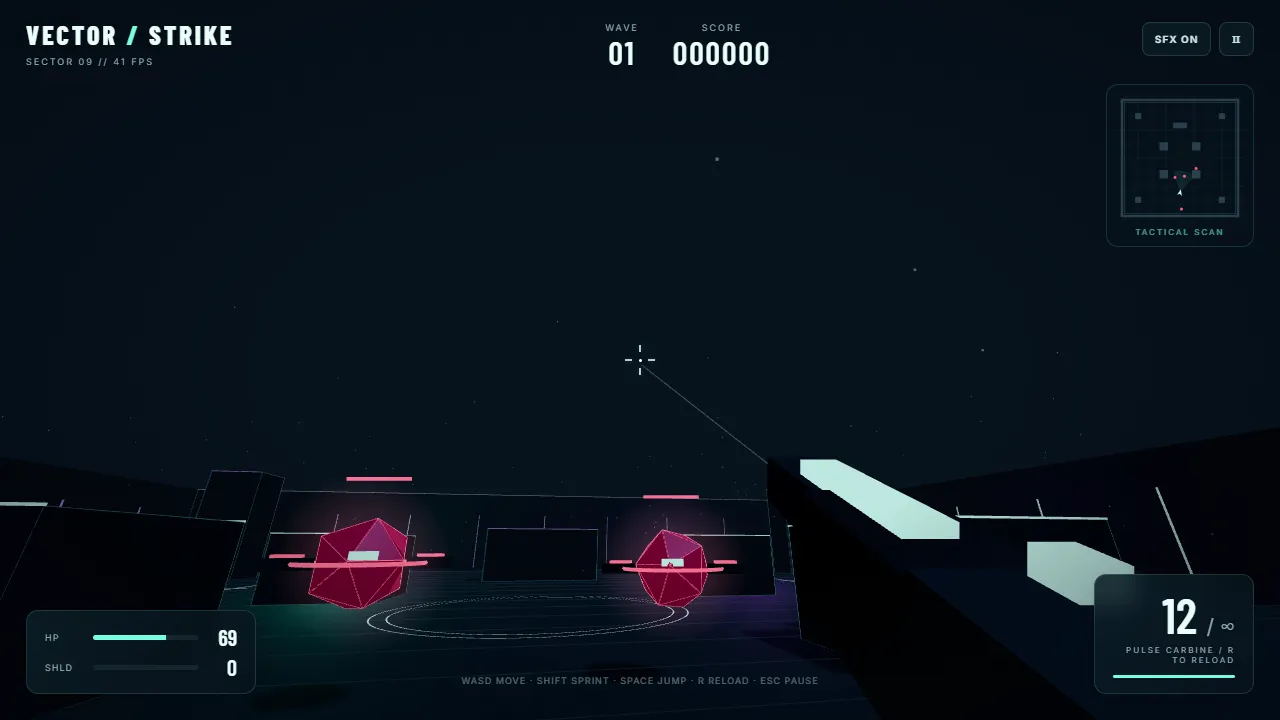
Vector Strike, built by GPT-6.1 Sol. Click inside the game to aim with your mouse; press Esc to release it.
Vector Strike is a wave-based arena shooter against flying drones. What stands out:
A fair difficulty curve. Drones spawn one at a time, at most four at once in the first wave, and spend a moment materializing before they move. Elite drones only appear from wave 3.
Cover that matters. Blocks stop bullets in both directions, and drones only fire when they can see you.
Room to recover. Your shield recharges after five seconds without damage, destroyed drones can drop repair kits, and every cleared wave restores some health and shield.
Score chains. Quick kills build a chain that multiplies your score up to 4×.
Polish. It has a briefing menu, a tactical map with cover and pickups, sound effects, a reload animation, sprint and jump, and the game pauses automatically when you switch tabs.
Touch controls. A movement stick, drag-to-aim, a fire button and light aim assist on phones and tablets.
Play Gemini 4 Argon's Game: Neon Overdrive
Gemini 4 Argon
Desktop: WASD to move, mouse to aim, click to fire, 1 to 3 to switch weapons, Shift to dash. Touch: twin sticks and buttons.
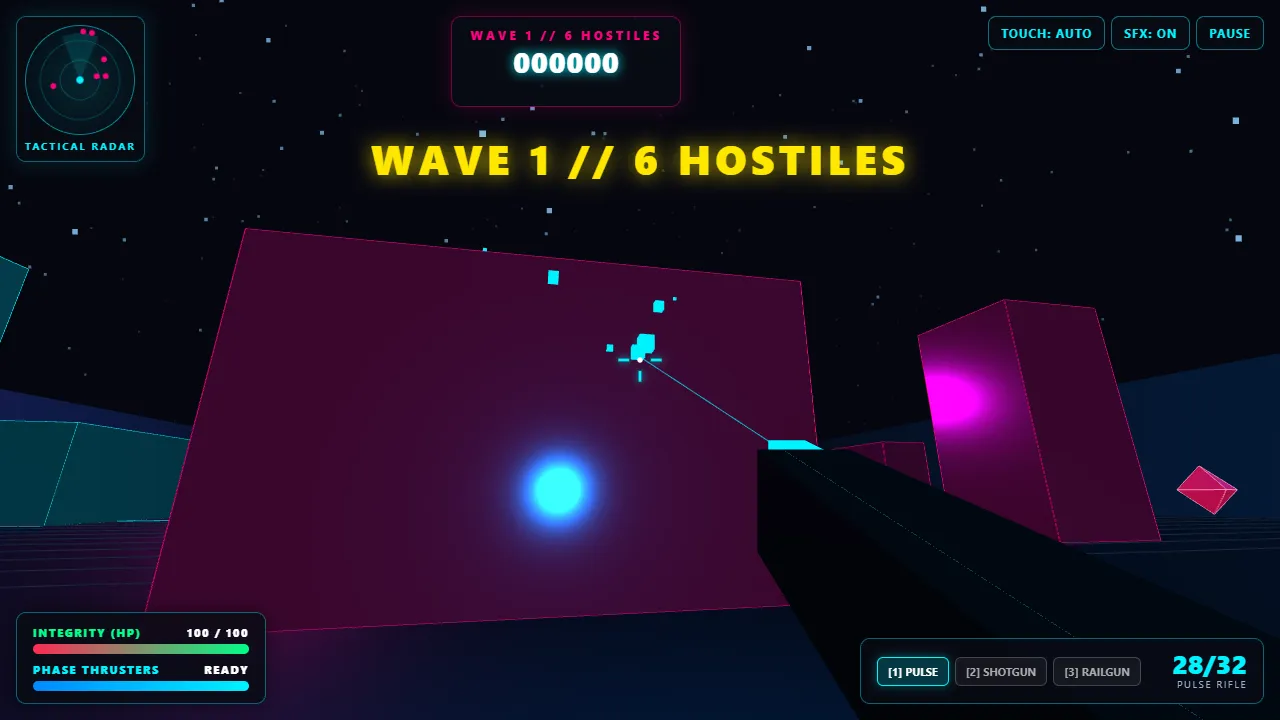
Neon Overdrive, built by Gemini 4 Argon. Click inside the game to aim with your mouse; use the PAUSE button to stop.
Neon Overdrive goes for more content and a louder neon style:
Three weapons. A pulse rifle, a scatter shotgun whose damage drops with distance, and a rail cannon.
Three enemy types. Fast melee stalkers, heavy goliaths and ranged strikers, with goliaths and strikers mixing in from wave 2.
Movement options. A phase dash on a cooldown, plus jumping, in a larger arena.
Combos and feedback. A score combo up to 8×, a kill feed, hit markers and a rotating radar.
A hard start. All six enemies of the first wave spawn at once and rush you, so you have to move right away. If you stand still, they wear down your health within seconds.
Head-to-Head Comparison
Gemini 4 Argon
GPT-6.1 Sol
Game
Neon Overdrive
Vector Strike
Generation speed
Faster
Slower
Credits used
About 114% more than GPT-6.1 Sol
About 53% fewer than Gemini 4 Argon
Weapons
3
1
Enemy types
3
2
Difficulty curve
Steep: the whole first wave attacks at once
Gradual: drones spawn one by one
Recovery
Health and ammo pickups, healing after each wave
Recharging shield, repair kits and healing after each wave
Touch controls
Twin sticks and buttons
Stick, drag-to-aim and aim assist
Our pick
Winner
Why GPT-6.1 Sol Won
Gemini 4 Argon wrote the bigger feature list, and it did it faster. But GPT-6.1 Sol wrote the better game:
It plays fairly. Enemies arrive gradually, use line of sight and give you ways to recover, so a run feels like a challenge instead of an ambush.
It handles the details. The game pauses when you switch tabs or release the mouse, shows a results screen with your time, wave and kills, and explains what went wrong if 3D graphics can't start.
It cost less. It used about 53% fewer credits than Gemini 4 Argon for the same request.
Gemini 4 Argon is still a strong choice when you want something fast or a long list of features to build on, but the game itself needed more tuning before it felt fair.
Which Model Risphai Uses for Coding
Risphai picks a model for each request based on the task and your quality preset. For coding, including games like these, GPT-6.1 Sol is the default from Balanced upward:
Request
Cost Efficient
Fast
Balanced
Quality
Extreme Quality
Coding
Other model
Other model
GPT-6.1 Sol
GPT-6.1 Sol
GPT-6.1 Sol
Quality presets are available on Paid plans. The Free plan uses Cost Efficient.
Your own choice. In Advanced mode on Paid plans, you can pick the coding model yourself, including Gemini 4 Argon Thinking and GPT-6.1 Sol Thinking with different reasoning efforts.
Fallbacks. If a model is unavailable, Risphai uses another suitable model so the request can still finish.
How to Build a Game With Risphai
Choose a paid plan on the Pricing page and use the Balanced preset or higher.
Describe the game. Name the genre, the controls and anything that matters to you, and ask for a single HTML file.
Play it in the chat. Risphai can run the HTML it writes in a sandboxed preview, so you can test the game right away.
Iterate. Ask for changes like "make the first wave easier" or "add a second weapon", and run it again.
Prompts to Try
"Build a 3D arena shooter in one HTML file with Three.js, waves of drones, cover and touch controls."
"Make a 2D platformer in one HTML file with three levels, coins and a timer."
"Create a Tetris-style puzzle game in one HTML file with a high score and keyboard and touch controls."
"Build a two-player snake game in one HTML file, one player on WASD and one on the arrow keys."
About These Games
Both games are hosted exactly as the models wrote them, with one change: the Three.js library and fonts load from risphai.com instead of public CDNs, so playing them sends no requests to third parties. Each game runs in a sandbox that is separate from this page and your Risphai account. Best scores aren't saved between visits.
Try It Yourself
Want to see what GPT-6.1 Sol builds for your idea? Upgrade on the Pricing page, describe your game and Risphai picks the model, writes the prompt and lets you play the result in the chat. New to Risphai? Start with what Risphai is and how it works.
Frequently Asked Questions
Is GPT-6.1 Sol or Gemini 4 Argon better for making games?
In our 3D shooter test, GPT-6.1 Sol built the more balanced and more polished game and used about 53% fewer credits. Gemini 4 Argon finished faster and packed in more content, such as three weapons and three enemy types. This was one test with one request, so results can differ for other games and prompts.
Can I play the games from this test?
Yes. Both games are playable in this article. Press Play, then click inside the game to aim with your mouse, or use the on-screen controls on a phone or tablet. Each game runs in a sandbox, separate from the article and your Risphai account.
Which model does Risphai use for coding?
On paid plans, the Balanced, Quality and Extreme Quality presets send coding requests to GPT-6.1 Sol by default. The Free plan uses the Cost Efficient preset, which uses a different, lower-cost coding model.
Can I use Gemini 4 Argon for coding on Risphai?
Yes. On a paid plan, switch to Advanced mode and choose Gemini 4 Argon Thinking as the coding model. You can switch back to GPT-6.1 Sol or any other coding model at any time.
How much does it cost to build a game with Risphai?
It depends on the model, the reasoning effort and how much code the model writes. In this test, GPT-6.1 Sol used about 53% fewer credits than Gemini 4 Argon for the same request. The exact credits are shown for each response, and current model prices are on the Information page.
Did you change the code of the games?
We didn't change the game code. The only change is where each game loads its 3D library and fonts: instead of public CDNs, they now load copies hosted on risphai.com, so playing them sends no requests to third parties.
Can Risphai run the games it writes?
Yes. When Risphai writes runnable HTML, CSS and JavaScript, you can run it directly in the chat in a sandboxed preview, play it, and then ask for changes.
gpt-6.1 solgemini 4 argonai codingai game developmentmodel comparisonai models