GPT-Live-1.1 Voice Mode Is Now on Risphai: Talk to AI in Real Time
Talk to AI out loud with GPT-Live-1.1 voice mode on Risphai. Interrupt it anytime, ask it to search, create or research while you talk. See what's new and the price.
By Risphai
Voice mode on Risphai now runs on OpenAI's GPT-Live-1.1, at the same price as before.
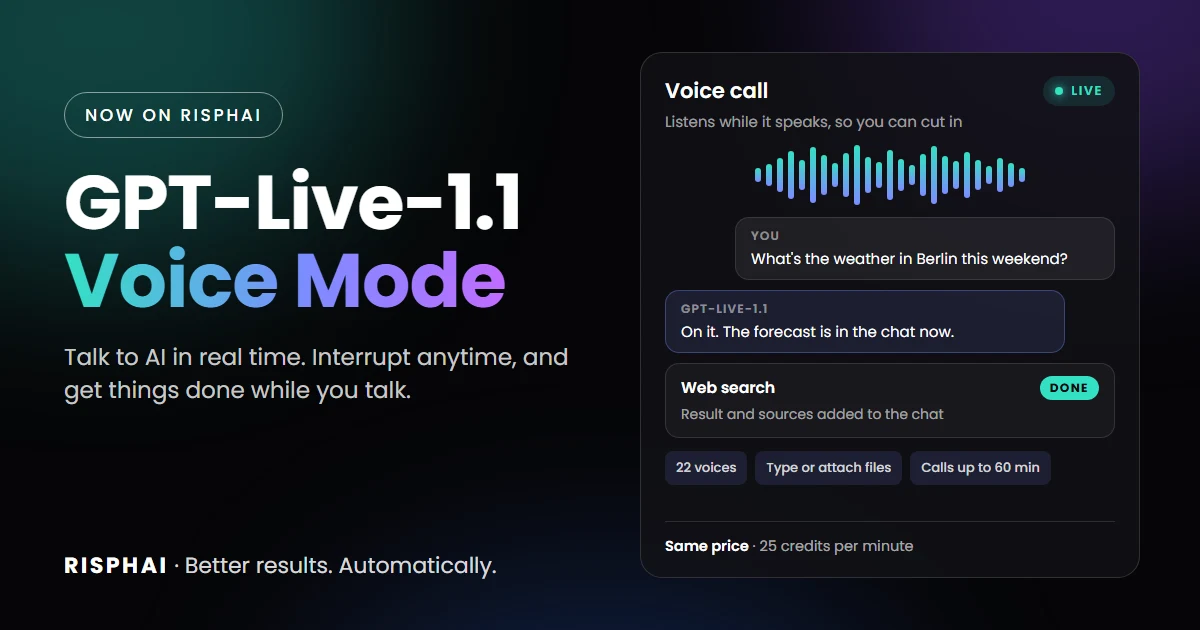
Voice mode on Risphai now runs on GPT-Live-1.1, OpenAI's newest model for real-time voice conversations. You talk, it answers out loud, and you can interrupt it at any time. When you ask for something bigger, like a web search, an image or a piece of research, it hands the task to Risphai and keeps talking with you while the result appears in the chat. The price stays the same: 25 credits per minute.
If you already use voice mode, you don't need to do anything. Your voice and call settings carry over, and your next call uses GPT-Live-1.1.
More accurate transcription and a steadier voice across languages, according to OpenAI
Interrupting
Yes, any time
Tasks during a call
Web search, reading links, research, images, video, music, code and files
Voices
22 to choose from
Longest call
60 minutes
Plans
Lite, Standard, Premium and Pay As You Go
Price
25 credits per minute, charged by the second (unchanged)
What's New in GPT-Live-1.1
OpenAI lists two improvements over GPT-Live-1 on its model page:
It understands you better. OpenAI says GPT-Live-1.1 transcribes speech more accurately. In voice mode, that means fewer misheard words, both in the answer and in the text of your message that appears in the chat.
It sounds the same in every language. OpenAI says GPT-Live-1.1 keeps a more consistent accent and voice across languages. If you speak another language or switch between languages in one call, the voice should stay more like itself.
These are OpenAI's own statements. We haven't measured them ourselves, and how well it works for you can depend on your language, microphone and surroundings.
Everything else about voice mode stays the same, including the price, the voices and what it can do.
What Is Voice Mode?
Voice mode lets you have a spoken conversation with AI, much like a phone call. Instead of typing a message and waiting for an answer, you just talk.
A few things make it feel natural:
It listens while it talks. GPT-Live models hear you even while they are speaking. If you want to correct it, add something or change the topic, just start talking and it stops to listen.
It answers simple questions right away. Quick questions, explanations and everyday conversation are answered by the voice itself.
It gets help for bigger tasks. When you ask for something that needs tools, voice mode hands it to Risphai, which picks a suitable model for the job. You can read more about how that works in What Is Model Routing?
The results show up in the chat. Answers, sources, images and other results appear in the same conversation, right under what you said. The voice tells you briefly when something is ready.
Your call becomes part of the chat. In a normal conversation, what you and the AI said is saved as text, so you can scroll back, copy an answer or keep going by typing after the call.
What You Can Do in a Call
You can ask for nearly anything you would type into Risphai. For example:
Look up what's happening now."What's the weather like in Berlin this weekend?" or "What happened in the news today?"
Read a link for you. Paste a link into the chat box during the call with a short note like "Summarize this article and give me the three main points."
Do some research."Compare the three most popular electric bikes under 2,000 euros and give me a table."
Create something."Make an image of a fox reading a book in a cozy library," or ask for a short video or a piece of music.
Ask about a photo or file. Attach an image or document in the chat box during the call with a question like "What does this chart show?" or "What are the deadlines in this contract?"
Practice a language."Let's practice ordering food in Spanish. Correct me gently when I make a mistake."
Think out loud."Help me plan my week. I have three deadlines and a dentist appointment."
Get help with code."Why does my loop never end?" with your code attached in the chat.
While a task is running, you can keep talking about something else. If you hang up, tasks that were already accepted keep running and their results stay in the chat.
Choose a plan. Voice mode needs the Lite, Standard or Premium plan or Pay As You Go credits. See the Pricing page.
Pick a voice (optional). Open AI Settings in the chat box and choose one of the 22 voices. Your choice is remembered for your next calls on this device.
Click the headphone icon in the chat box. You can start from the home page or from an existing conversation.
Allow microphone access when your browser asks, and start talking.
To end the call, click End call. You are back in the same conversation and can keep typing.
Controls During a Call
Mute your microphone when you need a moment. Muted time still counts as call time.
Type a message or attach an image or file in the chat box at any time during the call.
Change the response style in AI Settings, for example to get shorter or longer answers. This applies right away, without restarting the call.
Choose a function or model in AI Settings to decide how Risphai handles the tasks you hand off.
Tips for Better Calls
Use headphones if you can. They stop the AI from hearing its own voice and make interruptions work better.
Find a quiet spot. Background noise and other voices can be mistaken for you.
Say what you want at the start."Give me a short answer" or "Explain it like I'm new to this" works well.
Spell out tricky names. For names, addresses or numbers, it helps to repeat or spell them.
Check the chat for details. Long lists, tables, links and code are easier to read in the chat than to hear.
GPT-Live Voice Mode Pricing on Risphai
Voice mode costs 25 credits per minute of call time, the same as before. You are charged by the second, with a minimum of 15 seconds per call. Time spent muted, silent or waiting for a task counts as call time.
Tasks that voice mode hands off to Risphai, like a web search, research or an image, use credits in the same way as when you type the request. Your remaining balance is always shown in Billing.
Plan
Credits per month
Voice mode
If you only used credits for calls
Free
100
No
—
Lite
3,000
Yes
Up to about 120 minutes
Standard
7,500
Yes
Up to about 300 minutes
Premium
20,000
Yes
Up to about 800 minutes
Pay As You Go
As purchased
Yes
Depends on your credits
The minutes are a guide only. Most people use their credits for a mix of calls, chats and other tasks. Compare plans and prices on the Pricing page.
Is GPT-Live Voice Mode Free?
Voice mode isn't included in the Free plan. The Free plan gives you 100 credits every month for chatting and creating images, with no credit card needed, so you can try Risphai first. When you want to talk to it out loud, voice mode is included in every paid plan.
Privacy
Your live audio is processed by OpenAI to run the call. Risphai doesn't keep a recording of your call as conversation history. In a normal conversation, the text of the call and any results are saved in your chat like other messages. Incognito calls aren't saved to your history. Risphai doesn't train AI models on your conversations. See the Privacy Policy for the full details.
AI can make mistakes, and voices can mishear. Double-check important answers, especially about money, law or health.
Try GPT-Live-1.1 Voice Mode
Voice mode with GPT-Live-1.1 is live on Risphai now. Choose a plan on the Pricing page, click the headphone icon in the chat box and start talking. All changes in this release are in the v0.1.18 release notes.
OpenAI and GPT are trademarks of OpenAI. Risphai isn't affiliated with or endorsed by OpenAI. Model details are taken from OpenAI's developer documentation as of November 21, 2026.
Frequently Asked Questions
What is GPT-Live-1.1?
GPT-Live-1.1 is a voice model from OpenAI for real-time spoken conversations. It listens and speaks at the same time, so you can interrupt it naturally, and it can hand larger tasks to other AI tools. OpenAI describes it as a model for multilingual conversations.
What is new in GPT-Live-1.1 compared with GPT-Live-1?
OpenAI says GPT-Live-1.1 transcribes speech more accurately and keeps a more consistent accent and voice across languages than GPT-Live-1. On Risphai, the price, voices and features of voice mode stay the same.
Is GPT-Live-1.1 voice mode available on Risphai?
Yes. Since November 21, 2026, Risphai's voice mode runs on GPT-Live-1.1. It is available on the Lite, Standard and Premium plans and with Pay As You Go credits.
How much does voice mode cost on Risphai?
Voice mode costs 25 credits per minute of call time, charged by the second, with a minimum of 15 seconds per call. Time while you are muted or silent counts as call time. Tasks that voice mode hands off, such as web searches or image generation, use credits the same way they do in a normal chat. You always see your balance in Billing.
Can I use GPT-Live voice mode for free?
Not on Risphai's Free plan. Voice mode needs the Lite, Standard or Premium plan or Pay As You Go credits. The Free plan includes 100 credits every month for text and image generation.
Can I interrupt the AI while it is talking?
Yes. GPT-Live-1.1 keeps listening while it speaks. Start talking and it stops to listen, just like in a normal conversation.
Can voice mode search the web or create images?
Yes. Ask for current information, a summary of a link, research, an image, a video, music or help with code, and voice mode hands the task to Risphai. The result appears in the chat while you keep talking, and the voice tells you briefly when it is ready.
Which languages does voice mode speak?
Speak in your own language and voice mode answers in it. OpenAI describes GPT-Live-1.1 as a model for multilingual conversations and says it keeps a more consistent accent and voice across languages than GPT-Live-1. Quality can vary between languages.
Which voices can I choose?
There are 22 voices, including Marin, Cedar, Coral, Sage and Verse. Open AI Settings in the chat box and pick a voice before you start the call. The voice can't change during a call, but you can choose another one for the next call.
How long can a voice call be?
A single call can last up to 60 minutes. You can start a new call in the same conversation at any time, as long as your balance covers it.
Are my voice calls saved?
Risphai doesn't keep a recording of your call as conversation history. In a normal conversation, the text of what you and the AI said is saved in the chat, along with any results. Incognito calls aren't saved to your history. The Privacy Policy explains how voice data is handled.
gpt-live-1.1gpt livegpt live voice modegpt-liveopenai gpt livegpt-live-1ai voice modevoice modetalk to aireal-time ai voice chatai voice assistantopenaivoice