MiniMax H3 Max vs Flux 3 Max: Which AI Video Model Is Better?
MiniMax H3 Max vs Flux 3 Max: watch 4 AI videos made from the same prompts side by side, with sound. See how they differ, what they cost and how to try both.
By Risphai
The same prompt, two models. Left: MiniMax H3 Max. Right: Flux 3 Max. All four comparisons are below.
MiniMax H3 Max and Flux 3 Max are two of the newest AI video models, and you can use both on Risphai. We gave them the same four prompts and put the results side by side below, at full length and with sound. MiniMax H3 Max usually went in close with a natural, handheld look and costs less than half as much. Flux 3 Max usually pulled back for wider, more cinematic shots with more movement.
Both models were built by fal on top of an existing video model: MiniMax H3 Max on MiniMax's H3, and Flux 3 Max, together with Black Forest Labs, on Flux 3. Both turn a description or an image into a video with sound. So which one should you use? Watch and compare.
We gave both models the same text prompt for four different scenes and made one 5-second video with each. We made every video through fal, the provider Risphai uses to run both models, so these are the same models you use on Risphai. Every pair below came from the same prompt. The clips are shown at full length; we only resized them to the same frame size and compressed them for this page.
The clips start muted. Press the speaker button on a clip to hear the sound that model created, and the pause button to stop both.
This is a small hands-on test, not a benchmark. AI video changes from run to run, so another prompt or another try can look different.
Test 1: Ice Climber
The scene: an ice climber on a frozen ice wall.
MiniMax H3 Max
Flux 3 Max
VS
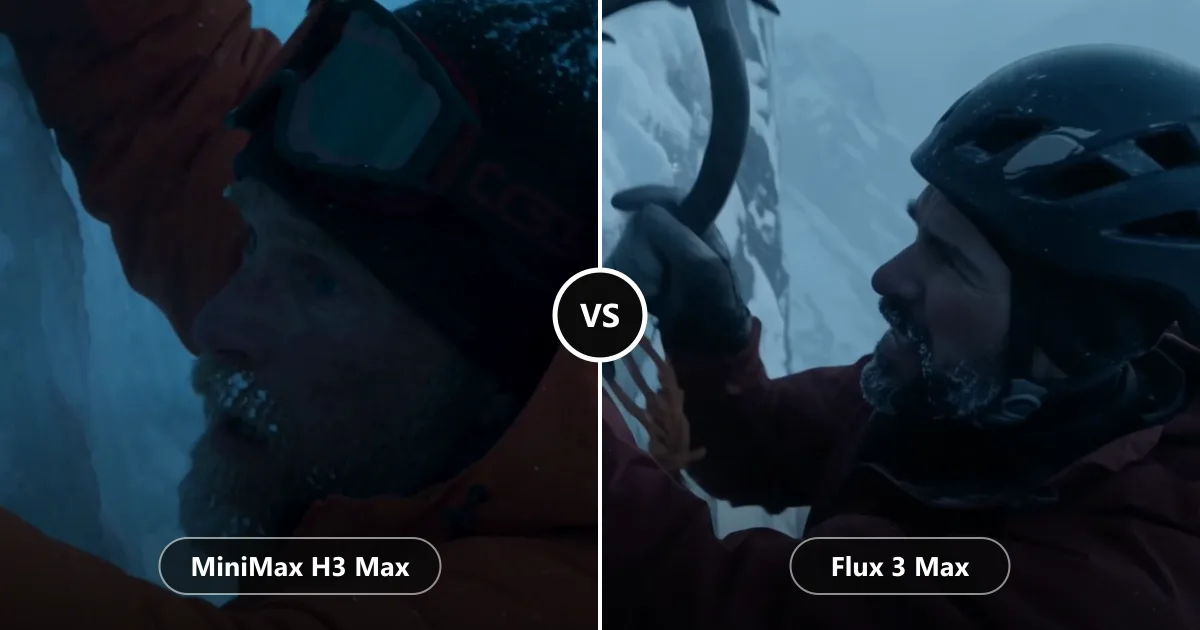
Same prompt, two models: MiniMax H3 Max and Flux 3 Max. Each clip is shown at full length.
MiniMax H3 Max goes very close. You see the frost in his beard as he reaches up, in a dark, cold blue light.
Flux 3 Max shows more of the climb. He raises his ice axe to the wall, and the frozen mountains behind him set the scene.
Test 2: Beach at Sunset
The scene: a young man on a beach as the sun sets.
MiniMax H3 Max
Flux 3 Max
VS
Same prompt, two models: MiniMax H3 Max and Flux 3 Max. Each clip is shown at full length.
MiniMax H3 Max feels like a moment filmed on a phone: close, handheld, with the wind in his hair and the sun right behind him.
Flux 3 Max feels like a film scene. The camera follows him along the water as the waves roll in and the sun sinks.
Test 3: Rock Climber
The scene: a woman climbing a sunlit rock face.
MiniMax H3 Max
Flux 3 Max
VS
Same prompt, two models: MiniMax H3 Max and Flux 3 Max. Each clip is shown at full length.
MiniMax H3 Max stays on the details: her hand finding a hold on the warm rock, then her face as she looks up.
Flux 3 Max shows the effort. She pulls herself up the wall, and the shot moves from her hands to her face with the valley below.
Test 4: Night at the Pier
The scene: a man on a beach at night, looking at a lit-up Ferris wheel on the pier.
MiniMax H3 Max
Flux 3 Max
VS
Same prompt, two models: MiniMax H3 Max and Flux 3 Max. Each clip is shown at full length.
MiniMax H3 Max paints a calm, colorful picture: a deep blue sky, a pastel Ferris wheel and a slow move toward him.
Flux 3 Max goes darker and moodier, with the pier lights reflecting on the wet sand and waves washing in.
What We Noticed
Framing. MiniMax H3 Max went closer in most tests, while Flux 3 Max chose wider shots that show more of the scene.
Movement. Flux 3 Max had more action and camera movement. MiniMax H3 Max was calmer and more intimate.
Look. MiniMax H3 Max often looked like real handheld footage. Flux 3 Max often looked like a scene from a film.
Light. Both handled difficult light well, from blue ice and golden sunsets to neon at night.
Sound. Both created sound for every clip. Turn it on above and judge for yourself.
Price. MiniMax H3 Max used less than half the credits of Flux 3 Max for the same length.
Which One Should You Use?
Choose MiniMax H3 Max when you want:
Close-ups and natural, social-media-style clips
More videos for your credits, for example to try out ideas
Videos on the Quality preset without choosing a model
Choose Flux 3 Max when you want:
Wide, cinematic shots with more movement
A polished final video, like a trailer shot or an ad
The model behind the Extreme Quality preset
Or use both. Try an idea with MiniMax H3 Max, then make your favorite with Flux 3 Max. Both can also animate an image, so you can keep the same starting frame.
How to Use MiniMax H3 Max and Flux 3 Max on Risphai
Pick a preset in the chat box settings: Quality for MiniMax H3 Max, Extreme Quality for Flux 3 Max. Or choose the model in Advanced mode.
Describe your video, like "A 10-second video of a surfer at sunrise, filmed from the water."
Or animate an image. Attach it with + and describe the motion.
You don't need to write a perfect prompt. Risphai adds the details the video model needs, and you can ask for changes afterwards.
Pricing
Video
MiniMax H3 Max
Flux 3 Max
5 seconds
~200 credits
~425 credits
10 seconds
~400 credits
~850 credits
15 seconds
~600 credits
~1,275 credits
MiniMax H3 Max Turbo, the default on the Cost Efficient, Fast and Balanced presets, uses ~20 credits per second. A small processing charge is added to every response, and you always see the exact credits used.
With 3,000 to 20,000 credits every month, a paid plan covers ~13 to ~90 five-second MiniMax H3 Max videos, or ~6 to ~42 with Flux 3 Max. Plans and prices are on the Pricing page, and current model prices are on the Information page.
Prompts to Try
"A chef flips vegetables in a flaming wok in a busy restaurant kitchen at night."
"A golden retriever runs through a field of tall grass toward the camera at sunset."
"A drone shot over a snowy mountain village with smoke rising from the chimneys."
"A skateboarder rolls through an empty city street in the rain, neon lights reflecting on the road."
"Make the waves move and the clouds drift slowly." (with a photo attached)
About These Videos
Every clip on this page was made by AI from a text prompt, through fal, the provider that runs MiniMax H3 Max and Flux 3 Max for Risphai. The people in them are AI-generated and not real. We made one video per prompt with each model and didn't edit them beyond resizing and compressing them for this page. MiniMax, Flux, Black Forest Labs and fal are the names of their respective owners.
Try MiniMax H3 Max and Flux 3 Max
Seeing is one thing, making your own is another. Choose a plan on the Pricing page, describe a scene and let MiniMax H3 Max or Flux 3 Max bring it to life with sound. Want to know more about Flux 3 Max? Read Flux 3 Max Is Now on Risphai.
Frequently Asked Questions
Is MiniMax H3 Max or Flux 3 Max better?
It depends on the video you want. In our four tests, MiniMax H3 Max usually went in close with a natural, handheld look and used less than half the credits. Flux 3 Max usually chose wider, more cinematic shots with more movement. We made one video per prompt with each model, so watch the clips and decide what suits you.
What is MiniMax H3 Max?
MiniMax H3 Max is an AI video model that makes videos with sound from a description or an image. fal built it on MiniMax's H3 video model to make it faster and to improve how closely videos follow your description, and it was released together with MiniMax.
What is Flux 3 Max?
Flux 3 Max is an AI video model made by fal together with Black Forest Labs, the team behind Flux. fal built it on Black Forest Labs' Flux 3 model. It makes videos with sound from a description or an image.
Do MiniMax H3 Max and Flux 3 Max videos have sound?
Yes. On Risphai, both models create videos with sound. On this page the clips start muted; press the speaker button on a clip to hear it.
Were the videos in this comparison made with the same models Risphai uses?
Yes. We made every video through fal, the provider Risphai uses to run MiniMax H3 Max and Flux 3 Max. Both models are available on Risphai's paid plans.
How much do MiniMax H3 Max and Flux 3 Max cost on Risphai?
MiniMax H3 Max uses ~40 credits per second of video, so a 5-second video uses ~200 credits. Flux 3 Max uses ~85 credits per second, so a 5-second video uses ~425 credits. A small processing charge is added to every response, and you always see the exact credits used.
Which Risphai preset uses MiniMax H3 Max or Flux 3 Max?
As of October 23, 2026, the Quality preset makes videos with MiniMax H3 Max and the Extreme Quality preset uses Flux 3 Max. Cost Efficient, Fast and Balanced use MiniMax H3 Max Turbo. In Advanced mode on a paid plan, you can choose either model yourself.
Can I use MiniMax H3 Max or Flux 3 Max for free?
No. Video creation is part of the paid plans. The Free plan includes 100 credits every month for chat and images. To make videos with MiniMax H3 Max or Flux 3 Max, choose a plan on the Pricing page.
Can MiniMax H3 Max and Flux 3 Max turn a photo into a video?
Yes. Both models can animate an image. Attach a photo or an image you made with + and describe how it should move.
How long can the videos be?
On Risphai, both models make videos from 5 to 15 seconds, in landscape, portrait or square.
What is MiniMax H3 Max Turbo?
MiniMax H3 Max Turbo is a faster, lower-cost version of MiniMax H3 Max. It uses ~20 credits per second of video on Risphai and is the video model on the Cost Efficient, Fast and Balanced presets.
minimax h3 maxflux 3 maxminimax vs fluxminimax h3flux 3falai video generatortext to videomodel comparison