AI Study Tools: How to Study Smarter With AI in Risphai
Study smarter with AI. Turn notes, PDFs and lectures into quizzes, flashcards, mind maps, flowcharts and charts in one chat. Try the live examples free.
By Risphai·Updated
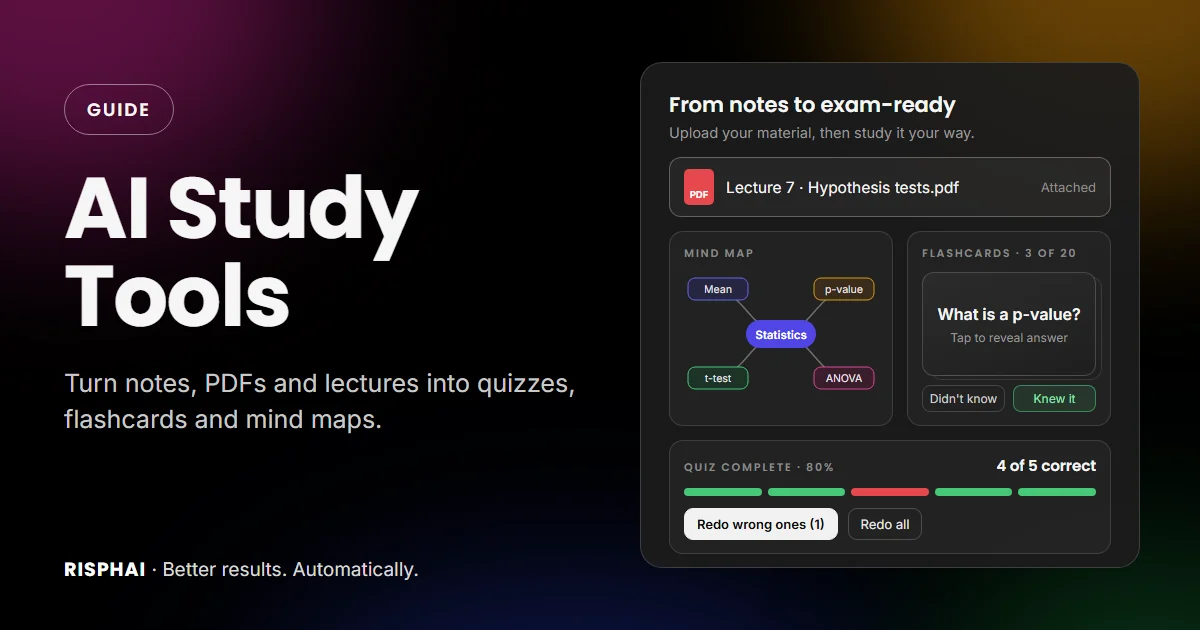
From your notes to a mind map, flashcards and a quiz, all in one chat.
AI study tools help you learn faster by turning your notes, documents and lectures into things you can actually study with: clear explanations, mind maps, quizzes, flashcards and study plans. In Risphai, all of that happens in one chat. Upload a PDF, ask for flashcards, test yourself with a quiz and see a diagram of how everything connects, on every plan, including the Free plan.
This guide walks through a complete study workflow with AI. Every quiz, flashcard set and diagram below is live, using the same viewers as the Risphai chat, so you can try them right here.
What AI Study Tools Can Do for You
Most studying comes down to a few jobs: getting the material in, understanding it, remembering it and checking that you really know it. Here's how Risphai helps with each one:
Study task
What Risphai does
Try asking
Get your material in
Reads PDFs, Word files, slides, spreadsheets, photos, audio, videos and links
"Summarize this lecture"
Understand a topic
Explains step by step, at your level, with examples
"Explain this like I'm new to it"
See the big picture
Draws mind maps, flowcharts and timelines
"Make a mind map of chapter 4"
Test yourself
Builds interactive quizzes with explanations
"Quiz me on this, 10 questions"
Memorize
Creates flashcards you can flip and mark
"Make flashcards from my notes"
Solve and visualize
Works through math and draws graphs with Python
"Plot this function and explain it"
Plan your revision
Makes study plans and can remind you to review
"Plan my next two weeks before the exam"
You don't need special commands. Ask in plain words, the way you'd ask a classmate or a tutor.
Why Testing Yourself Beats Rereading
Rereading and highlighting feel productive, but they're not the most effective ways to learn. A large review of learning techniques rated practice testing and spreading your study over time as the two most useful methods, while rereading and highlighting scored low.
That's where AI helps most. Writing good quiz questions and flashcards by hand takes hours. Risphai makes them in seconds from your own material, so you can spend your time actually practicing.
Turn Your Notes, PDFs and Lectures Into Study Material
Start with what you already have. Click + in the chat to attach:
Documents: PDFs, Word documents, PowerPoint slides, Excel spreadsheets and text files
Photos: pictures of a whiteboard, a textbook page or your handwritten notes (clear photos work best)
Audio: lecture recordings up to 2 hours
Video: clips up to 10 minutes
Links: a web page or a YouTube lecture, and Risphai reads the page or the video's transcript
Then ask for what you need: a summary, the key terms, the 5 most likely exam topics, a quiz or a set of flashcards. For recordings, Risphai transcribes what was said with timestamps, so you can ask "What did the lecturer say about confidence intervals?" and find the exact moment.
Transcription uses 50 credits per hour of audio. And please only record lectures when your school and lecturer allow it.
Understand Hard Topics With the AI Tutor
Sometimes you don't need the answer. You need to understand how to get there. Type / in the chat and pick the built-in AI Tutor prompt. Enter a topic or exercise and your level, and Risphai guides you in small steps instead of giving away the solution. It asks what you already know, checks your thinking and can make a quiz or flashcards when you want to test yourself.
A few prompts that work well for understanding:
"Explain standard deviation with a simple everyday example."
"I don't get why this proof works. Walk me through it one line at a time."
"What's the difference between mitosis and meiosis? Put it in a table."
"Give me a harder practice problem like this one, but don't show the answer yet."
See the Big Picture With Mind Maps and Flowcharts
A diagram shows how the pieces of a topic fit together, which is hard to see in pages of notes. Risphai draws mind maps, flowcharts, timelines and more right in the answer. You can zoom, drag, download a PNG for your notes and see the code behind it.
Mind maps for whole topics
Ask for a mind map before you dive into the details, or as a one-page summary when you're done:
You
Make a mind map of the causes of World War I for my history exam.
Risphai
A live mind map, rendered like in the Risphai chat. Zoom in, drag it around or download it as a PNG.
Flowcharts for decisions and processes
Flowcharts are perfect for anything with steps or choices, like a lab procedure, a legal test or picking the right method in statistics:
You
Make a simple flowchart that helps me choose the right statistical test.
Risphai
A live flowchart. It's simplified for independent groups and a numeric outcome, so check the details in your course materials.
Want it different? Ask in the same chat: "Make it left to right,""add paired tests" or "explain each test in one sentence." For a closer look at every format, read our guide to structured AI responses.
Test Yourself With AI Quizzes
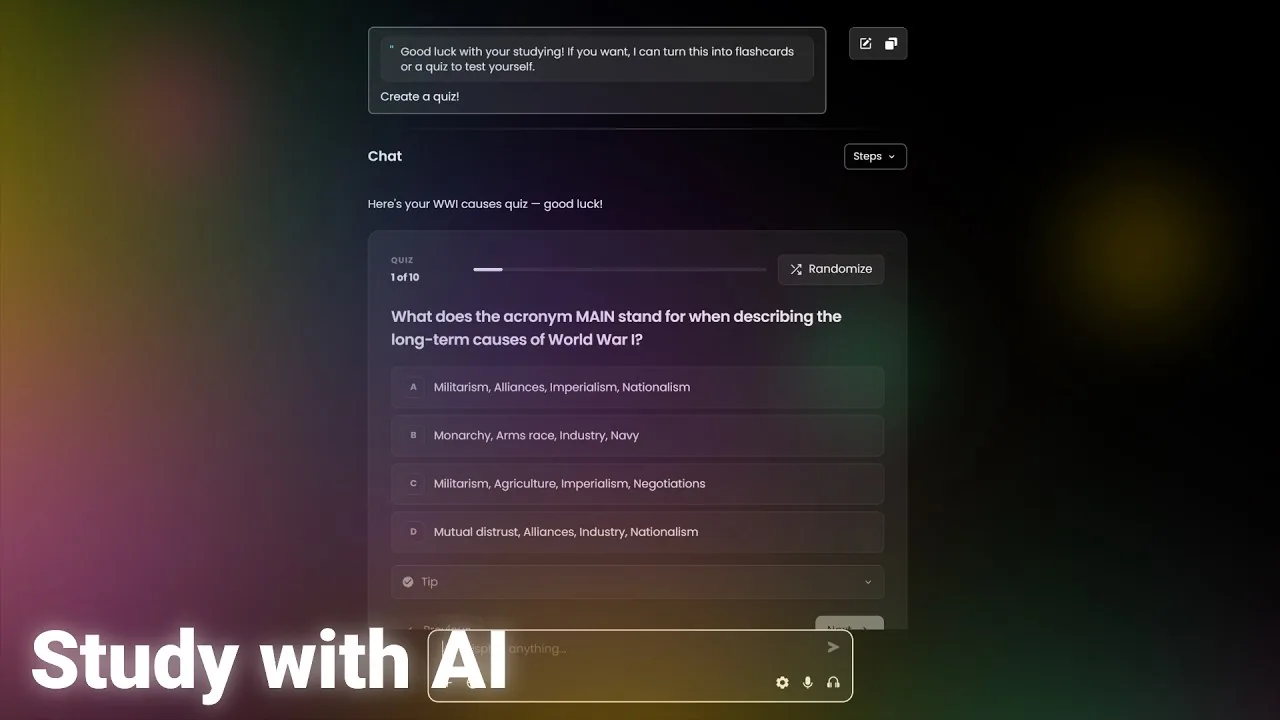
Once you've learned something, quiz yourself on it. Ask Risphai to quiz you on a topic, your notes or a document you upload, and you get an interactive multiple-choice quiz with an explanation for every option. You learn why the right answer is right and why the others are wrong.
Try it. Here's a quiz on the mind map above:
You
Quiz me on the causes of World War I, 5 questions.
Risphai
Quiz1 of 5
In which city was Archduke Franz Ferdinand assassinated in June 1914?
It was the capital of Bosnia.
A live quiz in Risphai's quiz viewer. The questions were written for this article.
When you finish, you see your score and can redo only the questions you got wrong, or press Randomize to shuffle the order for another round. Want it harder? Ask "make the next quiz tougher" or "focus on the dates I got wrong."
Memorize Faster With AI Flashcards
Flashcards are ideal for vocabulary, definitions, formulas and facts. Read the question, flip the card, then mark whether you knew it. At the end, you see how many you knew and can redo the rest.
You
Make flashcards for Spanish false friends and everyday phrases.
Risphai
Flashcards1 of 5
A classic false friend that causes awkward moments.
Reveal the answer, then mark how you did.
Live flashcards in Risphai's flashcard viewer. Tap a card to flip it.
Paste a vocabulary list, upload a chapter or just name a topic. You can ask for a specific number of cards, a difficulty level or cards in both directions, like Spanish to English and English to Spanish.
Like any AI output, quizzes and flashcards can contain mistakes. For exams and other important topics, compare them with your course materials.
Solve and Visualize Math, Science and Data
For math, physics, chemistry and statistics, Risphai can work through a problem step by step and write formulas as properly formatted math, like in a textbook. When a problem needs real calculation or a graph, it can run Python with libraries like NumPy and matplotlib and show you the result.
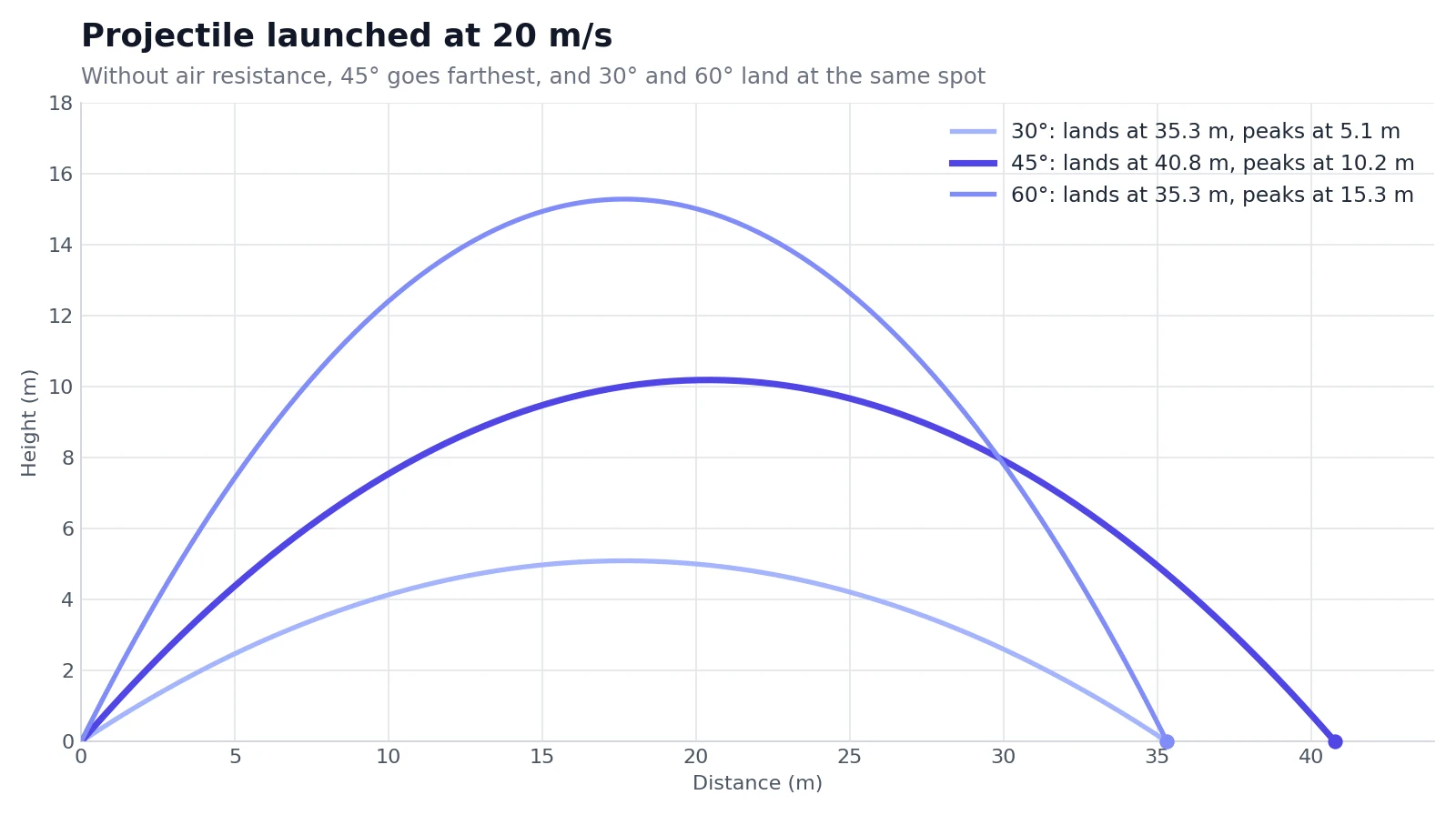
Click the chart to see it larger, or press View code to see exactly how it was made:
You
Plot the path of a ball thrown at 20 m/s at 30°, 45° and 60°, ignoring air resistance. Which angle goes farthest?
Risphai
Python execution completeProjectile paths at three launch angles
A chart made with Python and matplotlib. Press View code to see the code that drew it.
Seeing the three paths side by side makes the idea click: complementary angles like 30° and 60° land in the same place, and 45° goes the farthest. Python is also handy for statistics homework, checking your own calculations and plotting data from a lab or a spreadsheet. Each Python run uses 1 credit, on top of the credits for the answer.
Plan Your Revision and Stay on Track
Good studying is spread out over time. Tell Risphai your exam date and topics, and it can lay out a plan as a Gantt chart, with review sessions built in:
You
My statistics exam is on November 16. Make a two-week study plan with time for review.
Risphai
A live Gantt chart with a sample study plan. Ask for changes, for example to keep your weekends free.
Two more features keep a whole course organized:
Projects. Put a course's slides, readings and notes in one project and link your chats to it. Risphai then uses those files as context, so you don't have to upload them again for every question.
Scheduled tasks. Ask in plain words, like "Every weekday at 7 p.m., quiz me with 5 questions on hypothesis tests." Each run creates a new chat with the result, ready when you are.
Use AI for Studying the Right Way
AI is a great study partner when you use it to learn, not to skip the learning. A few ground rules:
Follow your school's rules. Many courses have an AI policy. Using AI to understand and practice is different from handing in AI-written work as your own.
Check important facts. AI can make mistakes. Compare key facts, formulas and dates with your textbook, lecture notes or other reliable sources, especially before an exam.
Do the thinking yourself. Try a problem first, then ask for a hint. The AI Tutor prompt is built for exactly that.
Respect privacy and copyright. Only record lectures when you're allowed to, and only upload material you have the right to use.
On privacy: Risphai doesn't use your conversations or personal data to train AI models, and incognito mode keeps a chat out of your history. Risphai is for people aged 18 and over, so it's a fit for university and college students, adult learners and anyone preparing for a professional exam.
Study Prompts to Copy
Paste any of these into Risphai and change the topic:
"Here are my lecture slides. Summarize the 10 most important ideas and make flashcards for each." (with your slides attached)
"Quiz me on this chapter, 10 questions, and make 3 of them tricky." (with a PDF attached)
"Make a mind map of the immune system with one level of detail."
"Make a flowchart of the steps of the scientific method."
"Explain the Krebs cycle simply, then quiz me on it."
"Here's my lecture recording. What were the main points, and what did the lecturer say about the exam?" (with audio attached)
"I have a contract law exam in 3 weeks. Make a study plan as a Gantt chart."
"Solve this integral step by step, then give me a similar one to try."
"Plot y = x² - 4x + 3 and mark where it crosses the x-axis."
A few tips for better results:
Give it your material. Quizzes and flashcards based on your own notes match your course much better.
Say how much you want, for example "8 questions," "15 cards" or "one page."
Tell it your level, such as first-year undergraduate or preparing for a professional exam.
Refine in follow-ups. "Harder," "only the ones I got wrong" or "explain number 3 again."
Free vs. Paid Plans for Studying
You can do everything in this guide on the Free plan. Paid plans give you room for a whole semester:
Free
Paid plans (Lite, Standard, Premium)
Credits per month
100
3,000, 7,500 or 20,000
Quizzes, flashcards, mind maps and diagrams
Yes
Yes
File uploads, transcription and Python (uses credits)
Yes
Yes, with more credits for more files and runs
Storage for your files
100 MB
10 GB, 20 GB or 50 GB
Projects for your courses
2
20, 40 or 100
Scheduled tasks
1
10, 20 or 50
More capable models
No
Yes
Choose the model yourself
No
Yes
Voice mode for spoken practice
No
Yes
Quick and Deep Research for essays and papers
No
Yes
Credit use depends on the request, and the exact credits are shown for each response. As a rough guide, transcribing a one-hour lecture uses 50 credits, which is half of the Free plan's monthly credits. Current prices are on the Pricing page.
Start Studying With Risphai
Pick one thing you need to learn this week. Upload your notes, ask for a mind map, then quiz yourself until you get every question right. Start free with 100 credits every month, no credit card needed, or compare plans on the Pricing page for more credits, storage and research.
Want better answers from every prompt? See how prompt optimization works in Risphai.
Study With Risphai: AI Quizzes, Flashcards and Mind MapsWatch on YouTube
Frequently Asked Questions
What are AI study tools?
AI study tools are apps that help you learn with artificial intelligence. They can explain topics, summarize notes and documents, make quizzes and flashcards, draw mind maps and diagrams, solve problems step by step and help you plan your revision. Risphai puts these tools in one chat, so you can go from your notes to a quiz without switching apps.
Can AI make flashcards from my notes or a PDF?
Yes. Upload a PDF, Word document or slides, or paste your notes, and ask Risphai to make flashcards. You get interactive cards you can flip and mark as known, and you can redo the ones you didn't know. Ask for a number of cards or a topic to focus on, for example "20 flashcards on chapter 3."
Can AI make a quiz from a PDF?
Yes. Attach the PDF and ask for a quiz, for example "Quiz me on this lecture, 10 questions." Risphai creates a multiple-choice quiz with an explanation for every option, shows your score at the end and lets you redo only the questions you got wrong.
Is Risphai free for students?
Risphai has a Free plan with 100 credits every month and no credit card needed. It includes quizzes, flashcards, diagrams, mind maps, file uploads and web search. Paid plans add more credits, more storage and projects, more capable models, voice mode and Quick and Deep Research. Risphai is for people aged 18 and over. Current prices are on the Pricing page.
Can AI summarize a lecture recording?
Yes. Upload an audio recording up to 2 hours or a video up to 10 minutes (up to 100 MB) and ask for a summary, key points, flashcards or a quiz. Risphai transcribes the audio with timestamps. Transcription uses 50 credits per hour of audio. Only record lectures when your school and lecturer allow it.
Is it cheating to study with AI?
Using AI to understand a topic, test yourself and plan your revision is a way of studying, much like working with a tutor or flashcards. Handing in AI-written work as your own can break your school's rules. Check your course's AI policy, and use Risphai's AI Tutor prompt if you want hints and guidance instead of finished answers.
Can AI help with math and science problems?
Yes. Risphai can work through math, physics and logic problems step by step, show formulas as properly formatted math and run Python to calculate results and draw graphs. Each Python run uses 1 credit. AI can still make mistakes, so check important results against your course materials.
Does Risphai use my notes to train AI models?
No. Risphai doesn't use your conversations or personal data to train AI models. You can also use incognito mode to keep a chat out of your history. Details are in the Privacy Policy.
ai study toolsstudy with aiai study assistantai for studentsai flashcard makerai quiz makerai mind mapai tutorexam prepguide