Structured AI Responses: Mermaid Diagrams, Charts, Mind Maps, Quizzes and Flashcards
Get AI answers as Mermaid diagrams, flowcharts, mind maps, Python charts, quizzes and flashcards. Try live examples and see how Risphai creates them for you.
By Risphai·Updated
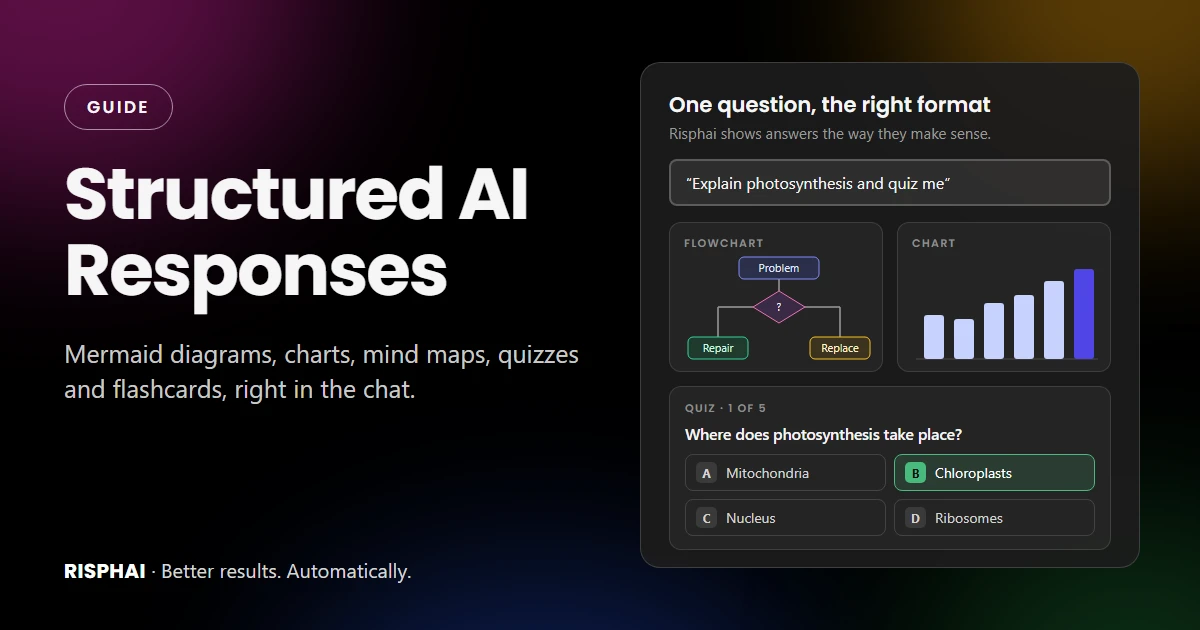
One chat, many formats: diagrams, charts, quizzes and flashcards right in the answer.
Structured AI responses are answers organized into a format that fits the question: a flowchart for a process, a mind map for a topic, a chart for numbers, a quiz to test yourself or flashcards to revise. Instead of a wall of text, you get something you can scan, click and reuse. Risphai adds diagrams, charts and maps when they make an answer clearer, and builds quizzes and flashcards when you ask. It works on every plan, including the Free plan.
This guide shows each format with a live example you can try right on this page. The quiz and flashcards below use the same viewer as the Risphai chat, and the diagrams are rendered the same way too.
What Are Structured AI Responses?
Most AI chats answer in paragraphs. That's fine for a quick question, but a lot of information has a shape: steps follow each other, ideas branch out, numbers go up and down. A structured response shows that shape directly.
Format
Best for
Try asking
Flowchart
Processes, decisions, how-tos
"Make a flowchart for..."
Mind map
Topics, brainstorming, study overviews
"Create a mind map of..."
Timeline
History, project milestones
"Show a timeline of..."
Other Mermaid diagrams
Sequences, Gantt plans, pie charts, states and more
"Draw a sequence diagram of..."
Python chart
Your own data, spreadsheets, trends
"Make a bar chart of these numbers"
Quiz
Testing what you know
"Quiz me on..."
Flashcards
Revising facts and definitions
"Make flashcards for..."
Map
Places, cities and routes
"Where is...?" or "Basel to Bern"
Tables, math and code
Comparisons, formulas, code snippets
"Compare X and Y in a table"
You don't need special commands. Ask in plain words, or just ask your question and let Risphai pick a format when one would help.
Why Structure Beats a Wall of Text
You see the big picture faster. A diagram shows how the parts connect in one look.
Decisions get clearer. A flowchart turns "it depends" into clear yes-or-no paths.
Numbers make sense. A chart shows a trend that's easy to miss in a list of figures.
You remember more. Testing yourself is one of the most effective ways to learn. A large review of study techniques rated practice testing among the most useful methods for students.
You can reuse the result. Download a diagram for slides, a report or your notes.
Mermaid Diagrams: Flowcharts, Mind Maps and More
Mermaid is a popular open-source tool that turns short text into diagrams. Risphai writes the Mermaid code for you and shows the finished diagram right in the answer, so you never have to learn the syntax.
Every diagram comes with controls to zoom in and out, drag it around, reset the view, download it as a PNG and see the code, which you can copy and edit in any tool that supports Mermaid. On a phone, use two fingers to move the diagram.
AI flowchart generator
Describe a process or a decision and ask for a flowchart. Try the controls in the top corner of this one:
You
Make a flowchart for deciding whether to repair or replace my laptop.
Risphai
A live Mermaid flowchart, rendered like in the Risphai chat. Zoom, drag, download it as a PNG or open the code.
Want changes? Just ask in the same chat: "Make it left to right,""add a step for backing up my files" or "use shorter labels."
AI mind map generator
Mind maps put one idea in the middle and branch out into everything connected to it. They're great for studying, planning and brainstorming.
You
Create a mind map of photosynthesis for my biology exam.
Risphai
A live Mermaid mind map. Use it as a one-page overview before you study the details.
Pie charts, timelines and more
Mermaid can draw many other kinds of diagrams, and Risphai can use all of the common ones:
Timelines for history and milestones
Sequence diagrams for who does what, and in which order
Gantt charts for project plans and schedules
Pie charts, bar charts and line charts for quick numbers
State, class and entity relationship diagrams for software and systems
Quadrant charts, user journeys, Kanban boards and more
You
Show my monthly budget as a pie chart: rent 1,200, food 450, savings 400, fun 220, transport 180.
Risphai
A live Mermaid pie chart, made from the numbers in the prompt.
AI Charts From Your Own Data
For quick charts, Risphai can use Mermaid. For your own data, it can also run Python, using common libraries like pandas and matplotlib, to calculate and draw the chart for you. Paste your numbers, or upload a CSV or Excel file, and say what you want to see.
The chart appears right in the answer. Click it to see it larger, download it, or press View code to check exactly how it was made:
You
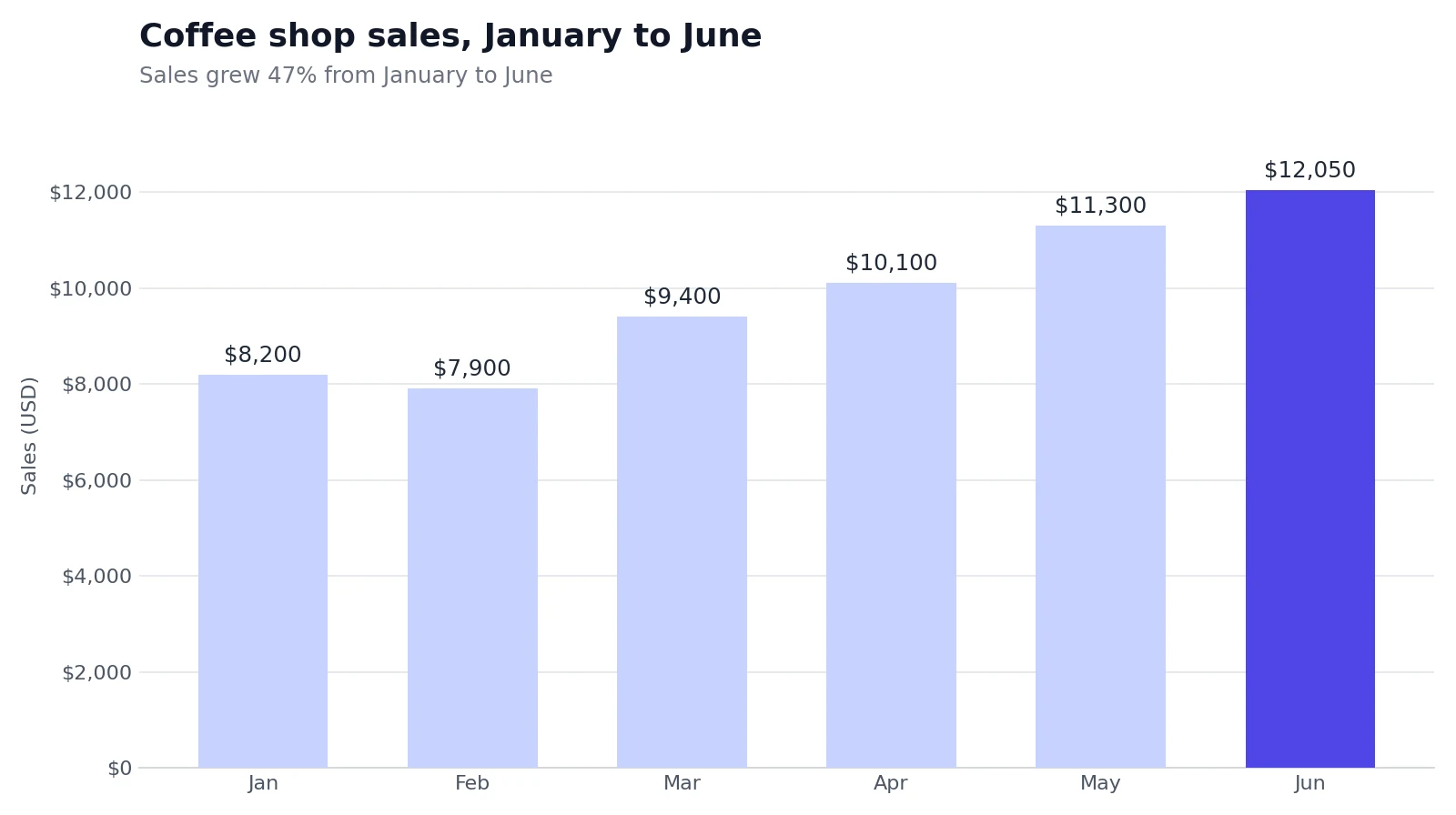
Here are my coffee shop's sales for the first half of the year: Jan 8,200, Feb 7,900, Mar 9,400, Apr 10,100, May 11,300, Jun 12,050. Make a chart.
Risphai
Python execution completeBar chart of monthly sales
A chart made with Python and matplotlib, using sample data. Press View code to see the code that drew it.
Because the numbers are calculated by code, totals and percentages come straight from your data, as long as the data you provide is correct. The same Python tool can also turn your data into files like Excel spreadsheets, PDFs, Word documents and PowerPoint slides. Each Python run uses 1 credit, on top of the credits for the answer.
AI Quiz Generator: Test Yourself in the Chat
Ask Risphai to quiz you on any topic, your notes or a document you upload. You get an interactive multiple-choice quiz right in the chat, with an explanation for every option, so you learn why the wrong answers are wrong too.
Try it. This quiz runs in the same viewer as the Risphai chat:
You
Quiz me on photosynthesis.
Risphai
Quiz1 of 5
Where in a plant cell does photosynthesis take place?
Think of the green parts of a leaf cell.
A live quiz in Risphai's quiz viewer. The questions were written for this article.
When you finish, you see your score and can redo only the questions you got wrong, or start over. The Randomize button shuffles the order for another round.
Quizzes are made when you ask for them, so Risphai won't turn every answer into a test. The built-in AI Tutor prompt in the / menu helps you learn a topic step by step and can make quizzes and flashcards for you.
AI Flashcard Generator: Flip, Mark and Repeat
Flashcards are perfect for definitions, vocabulary and facts. Read the question, flip the card, then mark whether you knew it. At the end, Risphai shows how many you knew and lets you redo the rest.
You
Make flashcards for the key facts about photosynthesis.
Risphai
Flashcards1 of 5
Two things go in, two things come out.
Reveal the answer, then mark how you did.
Live flashcards in Risphai's flashcard viewer. Tap a card to flip it.
Like any AI output, quizzes, flashcards and diagrams can contain mistakes. For exams and other important topics, compare them with your course materials.
Maps, Tables, Math and Code
Some answers need a different kind of structure:
Maps. Ask about a real place, such as a city, a restaurant or a route like "Basel to Bern," and Risphai can show a Google Map right in the answer, with one map per place when it lists several.
Tables. Comparisons, pros and cons, plans and schedules are easier to read in a table.
Math. Formulas are shown as properly formatted math, like you'd see in a textbook.
Code. Code comes in highlighted blocks you can copy. For small websites, games and tools written in HTML, CSS and JavaScript, press the play button on the code block to run them in your browser.
Related questions. When it's useful, Risphai suggests up to three follow-up questions you can click.
You
Show me a map of New York City.
Risphai
New York City, USA
This Google Map is loaded from Google. Loading it shares data such as your IP address with Google.
A live Google Map, shown the same way as in the Risphai chat.
How to Ask for a Structured Response
You can let Risphai decide, or name the format you want. Both work. Some prompts to try:
"Explain how a bill becomes law in the US as a flowchart."
"Create a mind map for planning a wedding."
"Make a Gantt chart for a 6-week website project."
"Draw a sequence diagram of what happens when I pay with a card."
"Here's my spending for the last 3 months. Make a pie chart." (with your numbers or a spreadsheet)
"Quiz me on the causes of World War I, 8 questions."
"Make flashcards from these notes." (with your notes pasted or a document attached)
"Compare the iPhone and Pixel cameras in a table."
A few tips for better results:
Name the format if you have one in mind: flowchart, mind map, timeline, chart, quiz or flashcards.
Say how big it should be, for example "5 steps," "10 cards" or "keep it to one level of detail."
Give your data or notes. Quizzes, flashcards and charts are only as good as what they're based on.
Refine in follow-ups. "Make it left to right," "add a step," "make the questions harder" or "only the ones I got wrong."
Free Plan vs. Paid Plans
Structured responses work on every plan. Paid plans give them more to work with:
Free
Paid plans (Lite, Standard, Premium)
Credits per month
100
3,000, 7,500 or 20,000
Mermaid diagrams, mind maps and timelines
Yes
Yes
Quizzes and flashcards
Yes
Yes
Python charts and files (1 credit per run)
Yes
Yes, with more credits for more runs
Maps, tables, math and code
Yes
Yes
More capable models
No
Yes
Choose the model yourself
No
Yes
Quick and Deep Research
No
Yes
Video and audio generation
No
Yes
Credit use depends on the request, and the exact credits are shown for each response. Pay As You Go credits also unlock features like model selection, research and video and audio generation. Current prices are on the Pricing page.
Try Structured Responses on Risphai
Ask your next question the way you normally would, or ask for the format you want. Risphai turns it into a diagram, a chart, a quiz or flashcards when that helps. Start free with 100 credits every month, no credit card needed, or compare plans on the Pricing page for more credits, more capable models and research.
A structured AI response is an answer organized into a format that fits the question, such as a flowchart, a mind map, a chart, a table, a quiz or flashcards, instead of only paragraphs of text. Structure makes answers easier to scan, understand and remember.
Can AI create Mermaid diagrams?
Yes. Risphai writes Mermaid code and turns it into a diagram right in the chat. You can zoom, move the diagram, download it as a PNG and open the Mermaid code to copy or edit it. Mermaid supports flowcharts, mind maps, timelines, sequence diagrams, Gantt charts, pie charts and more.
How do I make a flowchart with AI?
Describe the process or decision in plain words and ask for a flowchart, for example "Make a flowchart for deciding whether to repair or replace my laptop." Risphai turns it into a diagram you can zoom, download as a PNG and change with follow-up messages like "add a step for backups."
Can AI make a mind map?
Yes. Ask Risphai for a mind map of any topic, such as "Create a mind map of photosynthesis." It creates a Mermaid mind map with the main idea in the middle and related ideas around it, which you can download as a PNG.
Can AI create quizzes and flashcards from my notes?
Yes. Paste your notes or upload a document and ask for a quiz or flashcards. Risphai builds interactive multiple-choice quizzes with an explanation for every option, and flashcards you can flip and mark as known. You can randomize the order and redo the ones you got wrong.
Can Risphai make charts from my data?
Yes. Paste your numbers or upload a spreadsheet and ask for a chart. Risphai can draw quick charts with Mermaid or run Python with libraries like pandas and matplotlib to create a chart image you can view, download and check the code for. Each Python run uses 1 credit.
Are structured responses free on Risphai?
Yes. Diagrams, charts, maps, quizzes and flashcards work on every plan, including the Free plan with 100 credits every month. Paid plans add more credits, more capable models, model selection, all quality presets, Quick and Deep Research and video and audio generation. Current prices are on the Pricing page.
Can I edit a diagram after it's created?
Yes. Ask for changes in the same chat, for example "make it left to right" or "add a step after checkout." You can also open the Mermaid code under the diagram, copy it and edit it in any tool that supports Mermaid.
structured responsesstructured ai responsesai mermaid diagram generatormermaid diagramsai flowchart generatorai mind map generatorai chart generatorai quiz generatorai flashcard generatorguide