How to Make Realistic AI Photos and Videos That Look Shot on a Phone
Make photorealistic AI photos and videos that look like they were shot on a phone. See real examples, get prompts to try and create your own in Risphai.
By Risphai
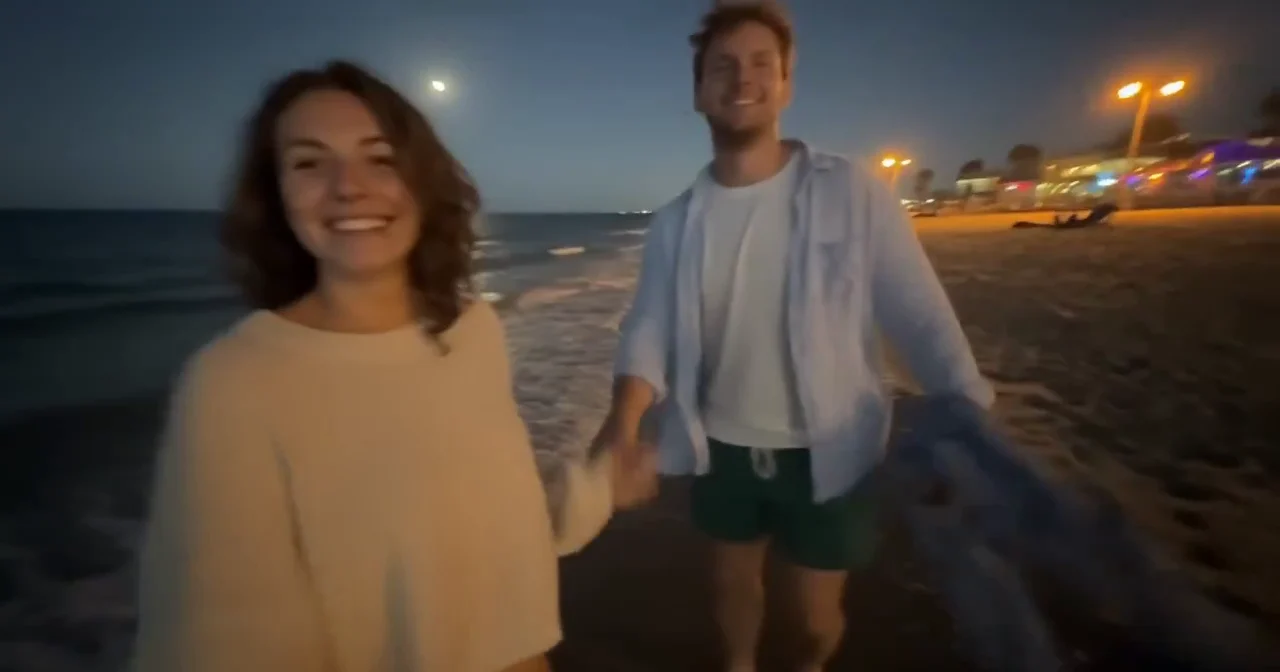
A frame from an AI video made with Flux 3 Max in Risphai. Neither person is real.
The most convincing AI photos and videos often don't look like polished stock images. They look like something a friend sent you: a little shaky, a little blurry, lit by street lights or a train window. With Risphai, you get that look by starting your request with two phrases: "phone photo of" for images and "a handheld phone recording of" for videos.
Every photo and video below was made by AI in Risphai, and none of the people in them are real. Here's how to make your own, with examples, prompts to try and the settings we used.
Why Phone-Style Shots Look So Real
Many AI images look too perfect: flawless light, sharp focus everywhere and models posing in a studio. Real phone pictures are rarely like that. They're taken in ordinary places, in whatever light is around, often while people are moving.
So instead of asking for a "beautiful, ultra-detailed photo," describe a moment someone might actually capture on their phone. The little imperfections, like motion blur, grain at night and slightly off-center framing, are what make the result believable.
How It Works in Risphai
Describe the moment. Start with "Phone photo of" or "A handheld phone recording of" and say what's happening, like "a couple walking on the beach at night."
Risphai picks the model. It automatically routes your request to a suitable image or video model for your request and your quality preset. You don't need to know which one to use. Here's how model routing works.
Risphai improves your prompt. It rewrites your request into a detailed prompt for that model, adding details like the light, framing and how the camera moves. Learn more about prompt optimization.
Refine it in the chat. Ask for changes, like "make it darker" or "less posed," until it looks right.
Realistic AI Videos That Look Filmed on a Phone
For video, ask for "a handheld phone recording of" your scene. Both videos below were made with Flux 3 Max, the video model fal built with Black Forest Labs, which is available in Risphai. Each is 10 seconds long and came with its own sound.
A Night Walk on the Beach
The phone follows a couple along the shore. She turns around, smiles and pulls the camera along by the hand, with the moon, the street lights and the blur of a phone recording in the dark.
Made with Flux 3 Max
A handheld-style AI video made with Flux 3 Max in Risphai. Tap the speaker to hear its sound.
Try a prompt like:"A handheld phone recording of a couple walking barefoot along the beach at night. She turns around, smiles and pulls the camera along by the hand."
Filmed From the Crowd at a Concert
A vertical video from the middle of the crowd: heads in silhouette, purple stage lights and a singer with a guitar, just like a clip you'd post to your story.
Made with Flux 3 Max
A vertical AI video made with Flux 3 Max in Risphai. Tap the speaker to hear its sound.
Try a prompt like:"A vertical handheld phone recording from the crowd at a small rock concert, purple stage lights, the singer playing guitar."
Making Videos With Flux 3 Max
Flux 3 Max was made by fal together with Black Forest Labs, the team behind Flux. On Risphai it makes 5- to 15-second videos with sound, in landscape, portrait or square, from a description or from an image you attach.
As of October 31, 2026, Flux 3 Max makes the videos on the Extreme Quality preset. On a paid plan, you can also pick it yourself at any time in Advanced mode. Read more in Flux 3 Max Is Now on Risphai.
Realistic AI Photos That Look Shot on a Phone
For images, start with "phone photo of." Both photos below were made with Risphai's Quality preset. Risphai chose the image model and wrote the detailed prompt.
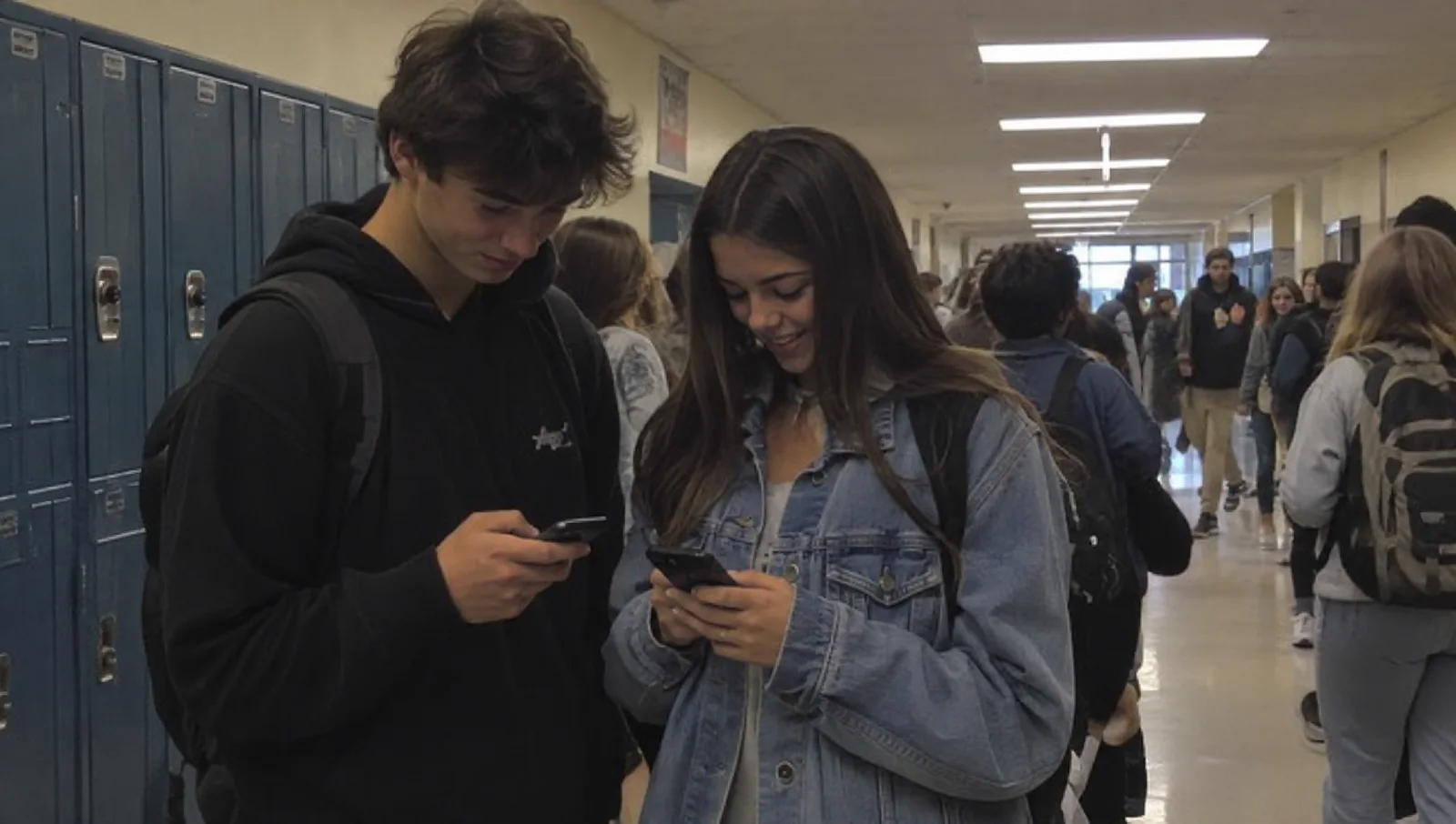
Friends in a School Hallway
Two students check their phones by the lockers between classes, under flat fluorescent lights, with a busy hallway behind them.
A phone-style AI photo made with the Quality preset in Risphai. Neither student is real.
Try a prompt like:"Phone photo of two high school friends looking at their phones by the lockers in a busy hallway between classes."
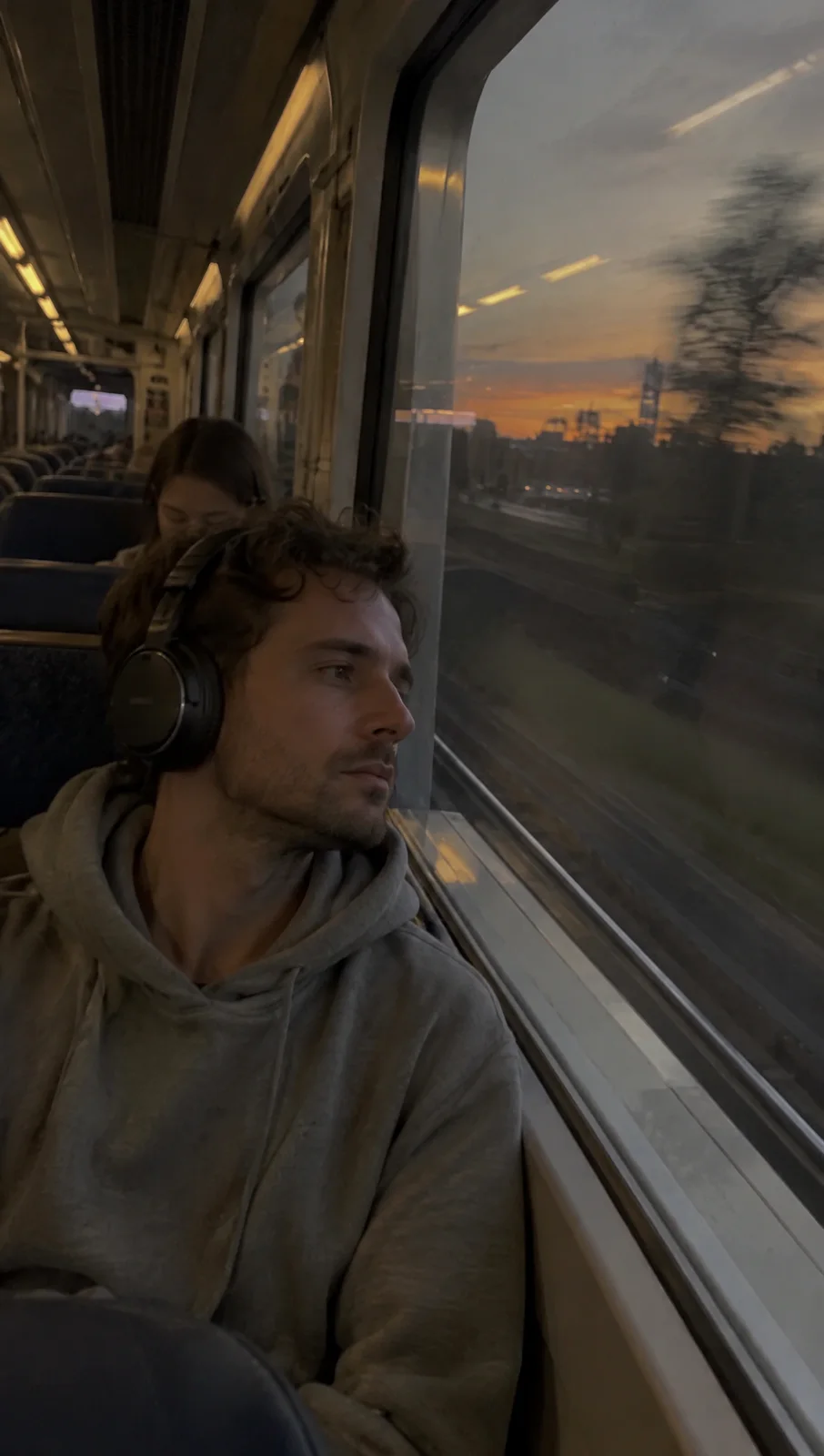
Looking Out of a Train Window
A tall, vertical shot of a man with headphones on a commuter train at sunset, with the trees outside blurred by the speed of the train.
A vertical phone-style AI photo made with the Quality preset in Risphai. The man isn't real.
Try a prompt like:"Vertical phone photo of a man with headphones looking out of a train window at sunset, trees blurred outside."
The Quality preset is available on paid plans and with Pay As You Go credits. On the Free plan, Risphai uses the Cost Efficient preset, so you can try phone-style photos for free, but they will look different from the examples above.
Tips for More Realistic Results
Start with the phrase."Phone photo of" or "A handheld phone recording of" sets the look right away.
Pick an ordinary moment. A hallway, a train ride, a kitchen, a night out. Everyday places look more real than fantasy scenes.
Name the light."Street lights at night," "fluorescent lights," "sunset through the window" or "phone flash."
Allow some imperfection. Words like "slightly blurry," "shaky," "motion blur" or "grainy at night" help.
Say who's filming."Filmed by a friend walking behind them," "a selfie video" or "from the crowd."
Choose the shape. Ask for vertical for stories and reels, or landscape for everything else.
Keep videos simple. One clear action, like turning around or waving, usually works better than a whole story.
Keep it short. Risphai fills in the details, and you can ask for changes in the same chat.
More Prompts to Try
Videos (paid plans and Pay As You Go):
"A handheld phone recording of friends laughing around a campfire at night."
"A handheld phone recording walking through a rainy city street at night, neon signs reflecting on the ground."
"A selfie video of a woman on a ferry, wind in her hair, the city skyline behind her."
Photos:
"Phone photo of a messy kitchen table after a birthday party, the morning after."
"Phone photo of a dog asleep on the back seat of a car, sunlight coming through the window."
"Phone photo taken from a balcony of a quiet street after the rain at dusk."
Which Plan Do You Need?
Free
Lite, Standard, Premium
Pay As You Go
Phone-style photos
Yes, Cost Efficient preset
Yes, every preset, including Quality
Yes, every preset, including Quality
Phone-style videos
No
Yes
Yes
Flux 3 Max
No
Yes
Yes
Choose models yourself
No
Yes, in Advanced mode
Yes, in Advanced mode
Credits
100 every month
3,000, 7,500 or 20,000 every month
Buy as needed, they don't expire
Flux 3 Max uses ~85 credits per second of video, so a 10-second video like the ones above uses ~850 credits, plus a small processing charge. Presets with lower-cost video models use fewer credits, and you always see the exact credits for each response. Plan prices are on the Pricing page, and current model prices are on the Information page.
Create Responsibly
Realistic AI media is great for stories, mood boards, concepts, social posts and fun. Use it fairly: Risphai's Terms don't allow impersonating anyone, unlawfully imitating a real person's likeness or voice, or using synthetic media to deceive or harm others. Where the law requires it, say that your photo or video was made with AI.
About These Examples
Every photo and video in this article was made by AI in Risphai. The photos were made with the Quality preset and the videos with Flux 3 Max. We picked them from our own generations, and AI results vary from run to run, so yours will look different. We only resized and compressed them for this page, and the cover is a cropped frame from the beach video. The people in them are AI-generated and not real. Flux, Black Forest Labs and fal are the names of their respective owners.
Start Creating
Try phone-style photos on the Free plan today. When you want the Quality preset, realistic videos and Flux 3 Max, choose a plan on the Pricing page.
Frequently Asked Questions
How do I make AI photos look like real phone photos?
Start your request with "Phone photo of" and describe an ordinary moment, like friends in a school hallway or someone looking out of a train window. Mention the light, such as street lights or a sunset. Risphai picks a suitable image model and rewrites your request into a detailed prompt, so a short sentence is enough.
How do I make a realistic AI video that looks filmed on a phone?
Ask Risphai for "a handheld phone recording of" your scene, for example "a handheld phone recording of a couple walking on the beach at night." Describe one simple action. Risphai picks a suitable video model, adds the details it needs and makes a 5- to 15-second video. Video creation is available on paid plans and with Pay As You Go credits.
Which AI model made the videos in this article?
Flux 3 Max, made by fal together with Black Forest Labs. It is available in Risphai. As of October 31, 2026, it makes the videos on the Extreme Quality preset, and on a paid plan you can also pick it yourself in Advanced mode.
Do I need to write a detailed prompt?
No. Describe what you want in plain words. Risphai routes your request to a suitable image or video model and rewrites it into a detailed prompt. If you want your exact words used, say "Use my prompt exactly."
Can I make realistic AI photos for free?
Yes. The Free plan includes 100 credits every month for chat and images and uses the Cost Efficient preset. The photos in this article were made with the Quality preset, which is available on paid plans and with Pay As You Go credits, so results on the Free plan will look different.
Can I make realistic AI videos for free?
No. Video creation is part of the paid plans and Pay As You Go credits. Plans and prices are on the Pricing page.
How much does a realistic AI video cost on Risphai?
Flux 3 Max uses ~85 credits per second of video, so a 10-second video uses ~850 credits plus a small processing charge. Presets with lower-cost video models use fewer credits. You see the exact credits for every response, and current model prices are on the Information page.
Are the people in these photos and videos real?
No. Every person in this article was created by AI in Risphai. They are not photos or recordings of real people.
Can I use the photos and videos I make commercially?
Risphai doesn't claim ownership of what you create. Under the Terms and the terms of the underlying AI providers, you may use your creations for personal or commercial purposes. Results aren't guaranteed to be unique, and you are responsible for rights in any third-party material, likenesses or trademarks they contain.
Can I make realistic AI photos of real people?
Risphai's Terms don't allow using it to impersonate someone, to unlawfully imitate a person's likeness or voice, or to use synthetic media to deceive or harm others. Create fictional people, or only use a real person's likeness where you have the right to.
realistic ai photo generatorai photo generatorphotorealistic ai imagesai generated phone photosrealistic ai video generatorai video generatorphoto ai genflux 3 maximage generationvideo generationguide